


I didn’t think much about proxies until my data collection script got blocked three times in a single afternoon. I’d built a simple price monitoring tool for a client – just checking product prices across a few e-commerce sites every couple of hours.
Around 2:47pm on a Tuesday, I got an alert that the script had failed. Again. The logs showed the same 403 error I’d been seeing all week. My IP had been flagged.
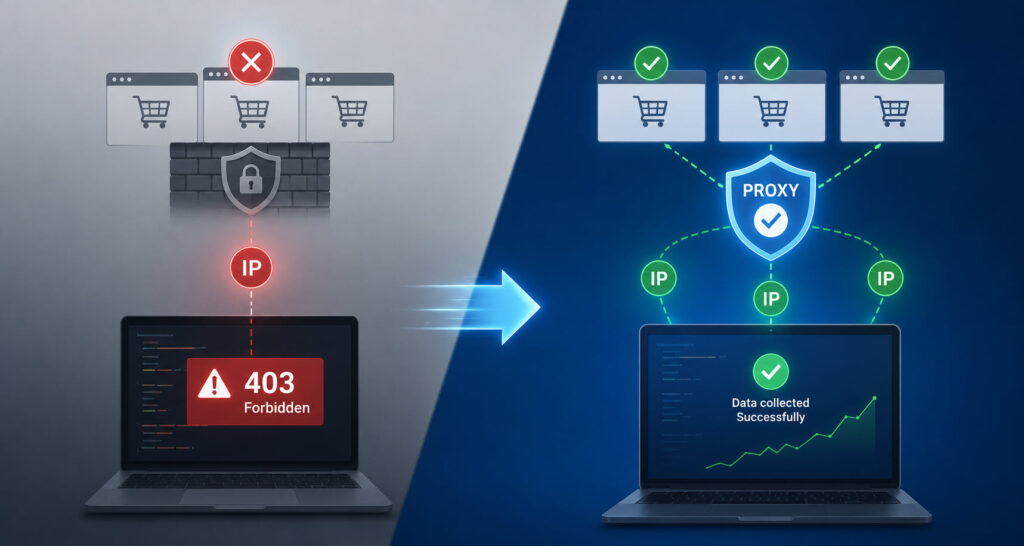
I probably should’ve seen it coming – hitting the same endpoints from the same address over and over like clockwork looks suspicious to any rate limiting system. I didn’t think a few requests every couple hours would trigger anything.
That’s when I realized I needed to buy proxy access and actually understand how this stuff works.
What Actually Gets You Blocked
I’d been developing web apps for about 4 years and knew about rate limits. But I didn’t really think about *how* sites detect automated traffic until I had to deal with it myself.
Websites don’t just count requests. They look at patterns. Your browser fingerprint. Your IP reputation. Whether you’re sending proper headers or if something looks off about your requests.
If you’re rotating user agents but hitting from the same residential IP in Ohio every 3.2 minutes, you’re gonna get flagged eventually because that’s not how real people browse.
I tried free proxy lists first (mistake number one). Half the IPs didn’t work. The ones that did were slow – 8-12 second response times – and I got blocked even faster because those IPs were already burned.
Modern anti-bot systems have gotten sophisticated – they analyze everything from your TLS fingerprint to mouse movements. Even minor inconsistencies in your request patterns can trigger flags. I learned this the hard way when perfectly formatted requests still got blocked because my timing was too predictable.
The Difference Between Proxy Types Actually Matters
Here’s what I’ve found after running different setups for about 7 months now.
Datacenter proxies are fast and cheap. But they’re easy to spot because most sites know the IP ranges that belong to cloud providers. They get flagged quickly with decent anti-bot protection. I used them for internal testing tools where speed mattered more than staying under the radar.
Residential proxies come from actual home internet connections – real ISPs, real households. When you send a request through one, it looks like it’s coming from someone’s house in Denver or Atlanta. Much harder to distinguish from regular traffic. I’ve been running my price monitoring through residential IPs for about 5 months without a single block.
Mobile proxies route through cellular networks (4G, 5G) and have the highest trust scores because blocking mobile IPs means potentially blocking thousands of legitimate users who share the same IP through carrier-grade NAT. I don’t use these much because they’re pricier, but for really strict sites they’re pretty much unblockable.
The trust level difference between these proxy types is massive. I ran tests on the same site using all three types, and datacenter IPs got blocked within 20 requests while residential and mobile proxies stayed clean through thousands of requests.
How I Actually Set This Up
First I figured out my bandwidth needs. My price monitoring script hits about 340 endpoints per day across 12 sites. Each response is maybe 200-400KB after compression. Roughly 100-140MB daily, call it 4.2GB per month with buffer for testing.
I went with pay-as-you-go instead of subscription because my usage isn’t consistent – some weeks I’m running tests constantly, other weeks the script just does scheduled checks.
Here’s something that surprised me: most proxy providers expire your bandwidth monthly. You buy 10GB, you’ve got 30 days to use it or lose it. I lost about $47.50 worth of unused bandwidth with my first provider. Now I specifically look for services where the bandwidth doesn’t expire.
The technical setup was easier than expected. You get a proxy endpoint, usually looks like gate.provider.com:8000, then authenticate either with username and password in the proxy URL or by whitelisting your server’s IP. I use the username method because I run scripts from different machines.
What I Wish Someone Had Told Me Earlier
Rotating vs sticky sessions confused me at first. Rotating means you get a different IP for each request or session. Sticky means you keep the same IP for a set time period – 5 minutes, 6 hours, whatever you need.
For my price monitoring, I use sticky sessions set to about 30 minutes because some sites check if you’re jumping between IPs mid-session. 30 minutes gives me enough time to hit multiple endpoints on the same site without triggering session-based detection.
Location targeting matters more than I initially thought. I can target down to city level. If you’re checking prices or content that varies by region, you need IPs from those specific regions or you’ll get wrong data. I spent two days debugging before realizing my proxies were defaulting to random US locations instead of the specific cities my client cared about.
The Numbers That Actually Matter
Success rate is huge. I’m seeing 99.3% uptime with my current setup – out of every 1000 requests, maybe 7 fail. With the free proxies I tried first, I was seeing 30-40% failure rates which is unusable for anything serious.
Response time matters too, but not as much as you’d think. My residential proxies average around 0.8-1.2 seconds. Mobile ones are closer to 1.5 seconds. That’s slower than a direct connection, but for most scraping or monitoring tasks an extra second per request doesn’t matter because you’re usually rate-limiting yourself anyway to avoid detection.
Connection limits used to trip me up. Some providers cap concurrent sessions at 100 or 500, and if you’re running multiple scripts or threads you’ll hit that ceiling fast. I specifically looked for unlimited concurrent sessions after hitting a 100-connection cap at 4am during a bulk data refresh.
And honestly – support matters more than expected. I’ve pinged chat at 11pm with a config question and gotten actual technical answers, not canned responses. When you’re debugging at odd hours, that’s worth something.
