


Modern AI agents are not single systems. They combine a reasoning model, task instructions, external tools and permission controls that determine what the agent may actually do. Platforms such as Agensi focus on the skills layer, where developers can add reusable instructions for tasks such as code review, testing and Git automation. Understanding how these layers interact is important because an agent becomes more capable as more systems are connected to it, but every added capability also creates another point that needs to be controlled.
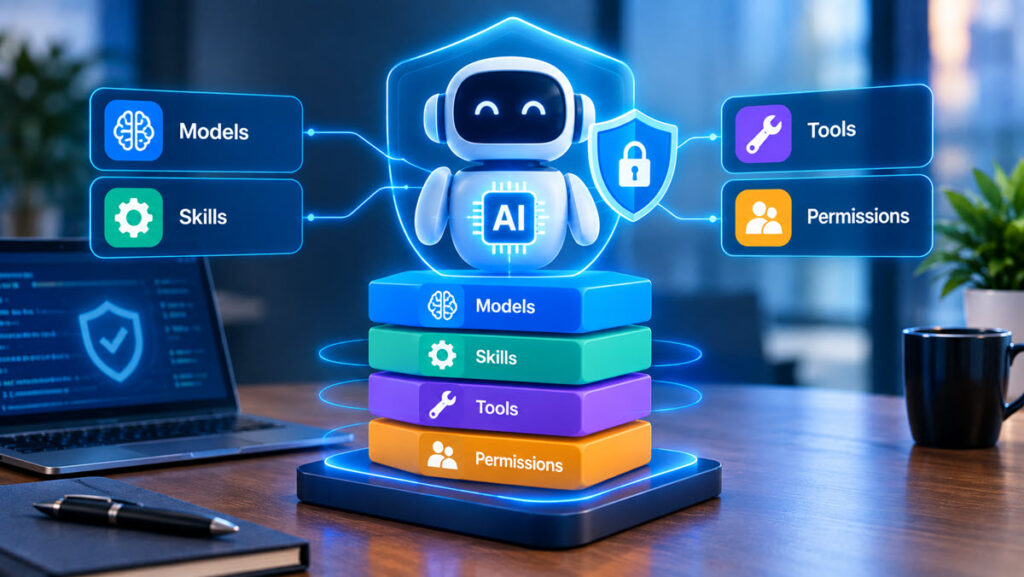
In short: the four layers of a safer AI agent stack
A safer AI agent stack separates four responsibilities. The model handles reasoning, skills describe how specific tasks should be approached, tools provide access to external systems and permissions define which actions are allowed. This separation helps developers avoid giving one component more control than it needs. Claude Code provides a useful example because its setup combines terminal access, skills, MCP connections and different permission modes within one working environment.
The model handles reasoning, not every safeguard
The language model sits at the center of the agent, but it does not represent the complete security model. In Claude Code, the underlying Claude model interprets instructions, analyzes code and determines which steps are likely to solve a task. Other layers still determine which information it can access and which actions it can perform. A capable model does not remove the need for permission boundaries, trusted instructions or controlled tool connections. Developers therefore need to evaluate the complete agent stack rather than treating model selection as the only important technical decision.
Skills define how an agent should work
Skills add structured instructions for recurring tasks. In Claude Code, SKILL.md files can describe processes for code review, testing, documentation, Git workflows and other development activities. They do not run as standalone programs. Instead, the agent reads their instructions and applies them when relevant.
Agensi provides skills for Claude Code and other compatible agents. This creates a reusable layer between the general model and the task being performed. A development team could define its preferred code review standards once and let an agent apply those instructions repeatedly rather than rebuilding the same guidance for every session.
Tools determine what the agent can reach
Skills tell an agent how to approach work, while tools determine which external systems the agent can interact with. MCP connections are one example. They can expose services such as GitHub, databases, project management platforms or internal systems to an AI agent. A code review skill might define how a pull request should be inspected, while a GitHub MCP connection provides access to that pull request. Combining the two creates a more capable workflow, but it also makes it important to understand exactly which systems and actions have been exposed to the agent.
Skills, tools and permissions serve different purposes
Separating the layers makes their responsibilities and security implications easier to understand:
| Layer | Main purpose | Example | Main security question |
| Skill | Tells the agent how to perform a task | Code review standards | Can these instructions be trusted? |
| MCP connection | Provides access to an external system | GitHub or a database | Which data and actions are exposed? |
| Permission | Limits what the agent may do | Read-only access | Does the task require this level of access? |
These components are complementary. A skill can define a procedure, an MCP connection can provide the information needed to perform it and permissions can determine whether the agent is allowed to inspect that information or change something in the connected system.
Permissions are the real control layer
Permission design determines how much autonomy an agent receives. Claude Code’s Plan Mode provides a useful example. In this mode, the agent can analyze a codebase and propose a plan while write tools remain blocked until further action is approved. Planning therefore does not need to provide the same level of access as execution.
This resembles the security principle of least privilege. An agent receives the capabilities needed for a particular stage rather than unrestricted access to the complete workflow. Reading a repository, changing a file and deploying code are separate actions with different consequences, so they do not necessarily need identical permissions.
What changes when agents start working in parallel?
Claude Code can use subagents for parallel tasks, with individual subagents operating in their own contexts and with their own permissions. This can help with larger jobs where different parts of a codebase can be handled simultaneously. It also creates additional execution paths. Developers need to understand which subagent is responsible for each task and which permissions it receives. As workflows become more distributed, clearly defined boundaries become more important rather than less.
Background agents add another security question
Background agents can continue running after the terminal has been closed. This makes them useful for longer tasks such as migrations, test suites and code generation, but persistence changes the way oversight works.
Developers should consider how long an agent remains active and which systems it can access during that period. The results of long-running tasks also need an appropriate review process. Persistent execution is not inherently unsafe, but permissions and supervision need to reflect the duration and potential consequences of the work.
A practical scenario: automated pull request review
A pull request review provides a practical example of how the layers can work together without giving the agent unrestricted repository access. The workflow could look like this:
- Model: interprets the proposed code changes and surrounding context.
- Skill: provides the standards for reviewing security, quality and style.
- MCP connection: retrieves the relevant pull request from GitHub.
- Permission: allows the agent to read and review the pull request without automatically merging it.
- Validation: a developer reviews the findings before consequential action is taken.
Each layer solves a different part of the problem. The model provides reasoning, the skill adds specialized instructions and the MCP connection provides access to the required data. Permissions then create a boundary around what the agent can actually do.
Third-party skills need appropriate scrutiny
Skills are instruction files rather than standalone executable programs, but they still influence how an agent approaches its work. Developers should therefore understand what a skill instructs an agent to do before incorporating it into an existing workflow. The same applies when multiple skills are combined. Agensi, for example, lists combinations involving code review, Git commit writing and pull request descriptions. Combining skills can cover more of a development process, but teams still need to understand how those instructions interact with available tools and permissions.
A safer stack separates capability from permission
The central security principle is simple: what an agent knows how to do should remain separate from what it is allowed to do. A model may understand a deployment process, a skill may describe that process and an MCP connection may expose the relevant system. None of those layers should automatically mean that the agent has permission to deploy.
A safer AI agent stack therefore combines reasoning, instructions, tool access and permissions deliberately. Agensi fits into this architecture at the skills layer by providing reusable instructions for agent tasks. The broader lesson is that stronger agents do not only need more capabilities. They also need clear boundaries around when and how those capabilities can be used.
