


macOS 27 Golden Gate does not install on any Intel Mac. If your Mac has an Intel chip, Tahoe (macOS 26) is the last version you can run, and that also caps the macOS virtual machines you can build on it. In this guide, I’ll go through the macOS 27 Intel support cutoff, your options for an Intel Mac, what changes for macOS VMs, and what the end of Rosetta 2 means on Apple silicon.
Short answer: macOS 27 Golden Gate needs an Apple silicon Mac (M1 or later). Intel Macs stay on macOS Tahoe 26 and keep getting security updates for about three years, according to Apple. An Intel Mac cannot host a macOS 27 virtual machine, and I found no credible report of macOS 27 running on a Windows or Linux PC. Rosetta 2 ends after macOS 27.
macOS 27 Intel Support: Which Macs Are Dropped
Golden Gate was released on 14 September. Apple’s supported list covers the MacBook Neo, MacBook Air and MacBook Pro with Apple silicon (2020 and later), iMac (2021 and later), Mac mini (2020 and later), Mac Studio (2022 and later) and Mac Pro (2023 and later).
Apple had already said that Tahoe would be the final macOS for Intel Macs. So the Intel models that ran Tahoe but cannot run Golden Gate are the last four Intel Macs Apple supported:
| Intel Mac dropped | Last macOS it can run |
|---|---|
| MacBook Pro 13-inch (2020, four Thunderbolt 3 ports) | macOS Tahoe 26 |
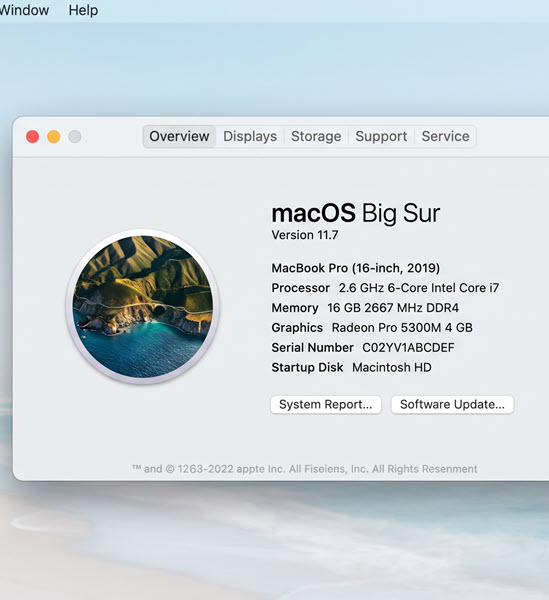
| MacBook Pro 16-inch (2019) | macOS Tahoe 26 |
| iMac 27-inch (2020) | macOS Tahoe 26 |
| Mac Pro (2019) | macOS Tahoe 26 |
Older Intel Macs were dropped in earlier releases, so they stop at something older than Tahoe.
To confirm your own machine, click the Apple menu > About This Mac and read the chip line. Anything that says Intel is out. The iMac is the one to watch: a few sites list 2020 as the cutoff, but the 2020 model is Intel. Apple’s list starts the supported iMacs at 2021.
What Intel Mac Owners Can Do Now
Nothing breaks on the day Golden Gate ships. Your Intel Mac keeps running Tahoe, and Apple has promised security updates for Intel Macs for three years. Apple has not published an end date, so treat “about three years after Tahoe” as the working number and watch Apple’s security releases page. The newest Tahoe release as I write this is 26.7, which came out alongside Golden Gate.
What you lose is new features. Apple Intelligence is Apple silicon only, so it stays out of reach on these Macs.
My view, in order of how much hassle each option is:
- Keep it as it is. If it is a personal Mac doing browser and office work, stay on Tahoe, install every 26.x update, and replace it when the security updates stop.
- Repurpose it. An Intel Mac is still a fine host for older macOS virtual machines (up to Tahoe), for testing, or as a spare machine with a fixed job.
- Replace it. Do this if you need Golden Gate features, or if people depend on the machine for work and you do not want to track an unpublished end date.
What Happens to macOS Virtual Machines
This is the part most articles skip. Golden Gate is Apple silicon only, so it follows that:
- An Intel Mac cannot host a macOS 27 VM. The guest cannot be newer than what the host hardware supports.
- An Apple silicon Mac can host macOS 27 guests, using Apple’s Virtualization framework (see Apple’s page on running macOS in a virtual machine on Apple silicon). It is Arm only, so you do not get Intel macOS guests there.
- A Windows or Linux PC is not an Apple silicon Mac. I found no credible report of macOS 27 running in a VM on an x86 PC. The community KVM projects, such as OSX-KVM, stop at Tahoe, and the “Golden Gate on VMware for PC” pages I came across are low quality unlocker guides. If you use VMware Workstation or VirtualBox on Windows for macOS guests, as in our VMware Unlocker for macOS guide, plan on Tahoe being the end of the line.
| Host | Newest macOS guest |
|---|---|
| Intel Mac | Tahoe 26 |
| Apple silicon Mac | Golden Gate 27 (Arm) |
| Windows PC (x86) | Tahoe 26 at best, via unofficial methods |
| Linux with KVM (x86) | Tahoe 26 at best, via community projects |
Apple’s macOS licence has also long tied macOS virtual machines to Apple-branded hardware. The wording I could read was from older releases, so check the licence text that ships with your version before you build anything beyond a personal test.
Virtualization Software Status
Parallels Desktop 27 dropped Intel Mac support (and Boot Camp). According to Parallels’ own release notes, Intel Mac users should stay on Parallels Desktop 26, which keeps getting periodic security and compatibility updates.
VMware Fusion is shakier on the Golden Gate host side. In a Broadcom community thread, Broadcom had announced no day-one Fusion support for macOS 27, and users reported crashes and hangs. One user said Fusion 26H1u1 kept working after upgrading from macOS 26.6.2, another said it failed on 27.0.1. Those are user reports, not a Broadcom statement, so wait for an official Fusion build before upgrading a Mac you use for VMs.
If you want a macOS 27 guest, expect some friction. During the beta, installs failed in several tools (UTM, Parallels, VMware and others) because of an incompatibility between the macOS 26.6 installer API and the macOS 27 image. The workaround was to build the VM on a Mac already running macOS 27, or to create a Tahoe VM and upgrade inside it through Software Update. I could not confirm whether the final release fixed this, so test with a throwaway VM first.
If your VM problems are about Apple Intelligence rather than the host, see Fix Apple Intelligence Not Working in a macOS VM.
Rosetta 2 Ends After macOS 27
If you are already on Apple silicon, the second half of this change matters more to you. Apple’s developer news says macOS 27 is the final release to support Rosetta, and that Intel-only apps will no longer run on Apple silicon Macs after it. Old games that depend on Intel frameworks are the stated exception. Golden Gate already shows a warning that an Intel app “will not open in macOS 28”, when you launch the app and in its Get Info window.
To see which of your apps are affected, open System Settings > General > About > Intel-Based Apps and click Details.
Apple has not announced a date for macOS 28, so use the warning list as your to-do list: update each app to a Universal or Apple silicon build, replace it, or stay on macOS 27 for the ones you cannot replace.
FAQ
Can I install macOS 27 on an Intel Mac?
No. Golden Gate needs an Apple silicon chip, M1 or later. Intel Macs stop at macOS Tahoe 26.
Will my Intel Mac still get security updates?
Yes. Apple has said Intel Macs get security updates for three years. No end date has been published.
Can I run a macOS 27 virtual machine on Windows or on an Intel Mac?
I found no credible report of it working on either. Golden Gate guests run on Apple silicon hosts. On x86 hardware, Tahoe is the last macOS you can realistically run.
Does macOS 27 still run Intel apps?
On an Apple silicon Mac, yes, through Rosetta 2. It is the last macOS release where Intel-only apps run, and warnings already say they will not open in macOS 28.
