


Every IT admin has been there. You get a ticket at 4:45 PM on a Friday: “Need port 3389 opened to the new file server, can you do it quick?” You type in the rule, hit apply, and hope nothing breaks. Most of the time, nothing does. But that one time a hastily typed /0 subnet mask opens RDP to the entire internet, or a deny-all rule gets accidentally reordered to the bottom of the ACL, and you spend the weekend cleaning up a mess that a simple review process would have caught.
New data from 2026 make the scale of this problem hard to ignore. FireMon’s Insights 2.0 report, based on 9.2 million policy checks since January 2025, found that 58% of firewalls fail high-severity compliance checks. Nearly half fail critical-severity checks. Those aren’t theoretical numbers. Each failure represents a rule that shouldn’t exist, a port that shouldn’t be open, or an access policy that violates a compliance requirement.

This article walks through a six-step framework for building a firewall change management process that works in real IT environments. Not a theoretical policy document you file away and forget. A practical workflow your team can implement this quarter, with specific steps for request intake, risk assessment, testing, deployment, monitoring, and cleanup.
Why Firewall Change Management Matters More Than Ever (New 2026 Data)
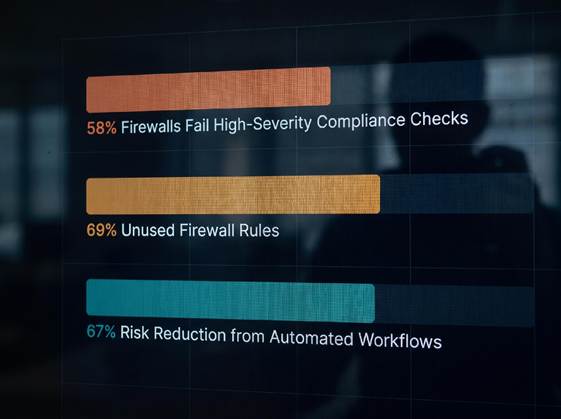
The numbers from FireMon’s June 2026 report paint a clear picture. Across the 9.2 million policy checks analyzed, 69% of firewall rules are unused. Nearly half of all rules lack an owner or any documentation. That’s not just administrative bloat. When a security incident happens and you need to know who created a rule and why, those undocumented rules become a liability. You can’t audit what you can’t explain.
The cost of getting this wrong keeps climbing. IBM and the Ponemon Institute’s 2025 Cost of a Data Breach report put the global average breach cost at $4.44 million. Cloud misconfiguration has become a leading attack vector. When firewall rules are changed ad hoc without review, testing, or documentation, the risk of a costly misconfiguration goes up significantly.
The good news is that a structured approach works. The same FireMon data show that automated change workflows reduce change-related risk by 67% compared to fully manual processes. That’s the gap most IT teams need to close. Moving from ad hoc firewall changes to a documented firewall change management process is the single highest-impact change most organizations can make this year. Those that implement automated change workflows consistently see fewer change-related incidents and stronger policy compliance outcomes.
Step 1: Build a Standardized Change Request Workflow
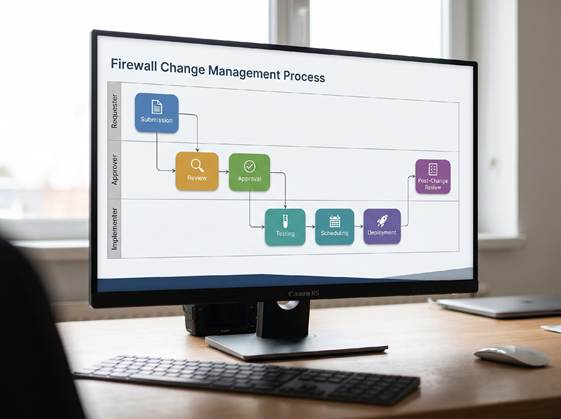
Start with the form. Without a standardized change request template, every team member fills in different details, and reviewers have to chase down missing information every time. A solid firewall change request should include: business justification for the change, risk level classification (high, medium, or low), the specific systems and IP ranges affected, the exact rule or policy being modified, a detailed backout plan, and the expected duration of the change.
Separation of duties matters here. The person requesting a change should never be the same person approving it or implementing it. That doesn’t mean you need a dedicated change approval board for every single rule tweak. For low-risk changes such as documentation updates or non-production rule adjustments, a lighter review process works. But any change touching production traffic paths or security policies needs at least one independent reviewer.
CIS Control 11 provides a useful baseline for this. It covers secure configuration management for network devices, including change tracking and baseline monitoring. You don’t need to adopt the full framework overnight, but pulling the change documentation requirements from it gives you a solid starting point.
Many IT teams resist formal change workflows because they worry about slowing down operations. The reality is that the time you lose filling out a proper request is less than the time you spend troubleshooting an undocumented change. As we discussed in our article on how overreliance on security tools creates blind spots, automation without process documentation leaves critical gaps in your security posture.
Step 2: Risk Assessment and Compliance Check
Every change request needs a risk classification before it reaches the implementation phase. This doesn’t have to be complicated. A three-tier system works well for most environments.
High-risk changes include broad CIDR range modifications, deny-to-allow rule flips, changes to VPN or remote access policies, and any rule that touches regulated data environments. These require at least two reviewers and a scheduled maintenance window. Medium-risk changes cover specific host-to-host rule additions, port modifications for known services, and access list adjustments within established security zones. A single technical reviewer plus standard change window is usually enough. Low-risk changes such as documentation updates, comment corrections, or rule renumbering with no functional impact can use an expedited path with post-change notification only.
The compliance dimension adds another layer. If your organization operates under PCI DSS v4.0, Requirement 1 mandates that firewall rulesets must be reviewed at least every six months with documented justification for every rule. NIST’s Cybersecurity Framework (CSF 2.0) includes specific governance controls around configuration change management that many auditors now look for during assessments. A well-documented change process makes these audits significantly less painful.
Start mapping each change request to the relevant compliance requirements during the risk assessment phase. If you’re changing a rule that affects cardholder data environments, flag it for PCI scope. If it touches federal systems, NIST CSF 2.0 provides the framework for documenting the change control rationale. Getting this right on the front end beats scrambling to reconstruct the audit trail after a compliance finding.
Step 3: Pre-Deployment Testing and Validation
Testing a firewall rule before deploying it sounds obvious. In practice, many teams skip it because they don’t have a non-production environment that matches their production network. If you can’t test, you’re gambling.
Configuration snapshots solve part of this problem. Before any change, take a full backup of the running configuration. If the change causes an outage, you can roll back to a known-good state in minutes instead of rebuilding rules from memory. Most modern firewall platforms include built-in configuration management tools for this, and there are open-source options for legacy gear.
What-if analysis tools are worth the investment. These let you simulate a proposed rule change against your existing policy set and see what traffic would be affected before you deploy. Tools such as Tufin, AlgoSec, and FireMon offer this capability. Even a manual pre-deployment review using a change impact matrix catches most obvious problems.
The FireMon 2026 data show a 67% reduction in change-related risk when automated workflows replace manual processes. That number comes from comparing environments with automated testing and validation against those where changes go straight from a ticket to the CLI. The delta is significant enough that if you’re still doing manual rule pushes without any pre-check, automating the testing step alone will cut your incident rate by more than half.
The full cost picture from the 2025 IBM Cost of a Data Breach report puts the motivation in dollar terms. At $4.44 million per breach, even a modest risk reduction through better change processes justifies the investment. The IBM Cost of a Data Breach Report 2025 makes the business case for change management straightforward.
Step 4: Controlled Implementation with Full Documentation
When the change passes testing, it’s time to deploy. Controlled implementation means three things: a defined change window, a documented rollback procedure, and a complete change log.
Maintenance windows exist for a reason. Deploying firewall changes during business hours increases the blast radius if something goes wrong. Even a short five-minute outage for a rule reload affects production traffic. Schedule changes during low-traffic periods and communicate the window to stakeholders.
The change log is what turns a one-off rule change into a documented policy. Every entry should record: who requested the change, who approved it, who implemented it, the exact time of implementation, the business justification, the systems affected, and the rollback steps taken if the change needed to be reversed. Tie every rule to its change ticket ID in the firewall’s comment field. This simple habit saves hours during incident response.
Establish a naming convention for rules and enforce it. Instead of “Allow RDP to server,” use a format such as “CHG-2026-0415-RDP-SRVWEB01.” The ticket ID in the rule name means anyone reviewing the ruleset can immediately pull up the full change context from your ticketing system. No guessing. No hunting through spreadsheets.
This level of documentation pairs naturally with a managed security operations function. Our deep dive on the benefits of managed SOC for business security explains how structured change documentation feeds directly into effective security monitoring and incident response.
Step 5: Post-Change Monitoring and Drift Detection
Deploying the change is not the end of the process. The highest-risk period for any firewall change is the first 24 to 48 hours after implementation. That’s when latent issues surface blocked legitimate traffic, unexpected log entries, or performance degradation.
Set up automated monitoring for the immediate post-change window. Watch for: new deny logs from the changed rule, sudden increases in CPU or memory usage on the firewall, connection timeouts from affected systems, and any alerts from your SIEM that correlate to the changed rule.
Configuration drift detection should run on a regular cadence. Daily configuration snapshots compared against the previous day’s baseline catch unauthorized changes within hours. Weekly diff reports give you a broader view of ruleset evolution over time. If a change appears in the ruleset that doesn’t match a change ticket, you have a drift incident that needs investigation.
The UK Government’s Department for Work and Pensions publishes a detailed firewall security standard that covers change management and drift detection. Their DWP SS013 Security Standard specifies documented change workflows with separation of duties, rule expiry enforcement, and a defined audit cadence. It’s a public-sector document, but the operational principles apply to any organization running firewalls at scale.
Step 6: Schedule Regular Audits and Rule Cleanup
The final step is the one most teams neglect. You build a clean ruleset, implement a change process, and then the rules accumulate over months until you’re back where you started.
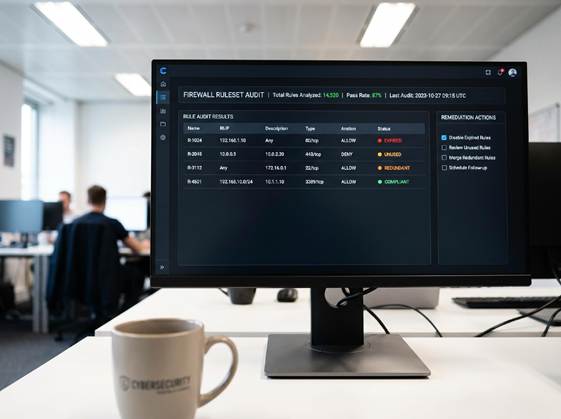
The FireMon 2026 data found that 17% of firewall rules in production environments are redundant or shadowed. That means nearly one in five rules is doing nothing useful, or worse, it’s being overridden by another rule without anyone realizing it. Redundant rules waste processing cycles and make troubleshooting harder. Shadowed rules create security gaps because the intended restriction never actually applies.
A practical audit cadence looks like this. Review temporary rules (time-based access, vendor connections, emergency changes) monthly and clean up anything expired. Run a full ruleset review quarterly, looking for unused objects, expired rules, and redundant policies. Conduct an annual recertification where every rule owner confirms their rules are still needed and documents the business justification.
Automation helps here too. Most firewall management platforms can generate unused-rule reports, identify shadowed rules through policy analysis, and flag rules that haven’t matched traffic in a defined period. If you’re managing more than a few hundred rules, manual review alone won’t cut it.
The balance between security and operational speed is a real tension. Our guide on how to safeguard your data without sacrificing speed covers strategies for maintaining security controls without dragging down your team’s ability to respond to business needs. A well-designed change process should enable speed, not block it.
Conclusion
A structured firewall change management process is one of the highest-impact investments an IT team can make. The 2026 data make one thing clear: most firewall environments carry significant policy debt, and the cost of a breach continues to climb. But the fix is not a massive overhaul. It starts with a single change request template and a commitment to documenting every rule.
Implement these six steps one at a time. Start with the change request form. Add risk classification next. Layer in testing, controlled deployment, post-change monitoring, and regular audits as your team adapts to the workflow. Each step reduces your risk profile and makes the next audit easier.
The tools and frameworks exist. The data support the approach. What’s missing in most organizations is the discipline to follow the process consistently. That starts with your team making the decision to change how you handle firewall changes.
