Close Menu
    What's Hot

    Fix Apple Intelligence Not Working in a macOS VM (VMware/UTM) on Windows 11/10 Host

    January 6, 2026

    Top Hamachi Alternatives for Virtual LAN Gaming in 2026

    January 1, 2026

    250+ Funny Facebook Status/Quotes/Posts in 2026 – Free AI Creator

    December 29, 2025
    Facebook X (Twitter) YouTube LinkedIn
    Facebook X (Twitter) YouTube LinkedIn
    SysprobsSysprobs
    • Tech Guides
      • Windows
        • Windows 11
        • Windows 10
        • Windows Servers
      • Virtualization
        • VirtualBox
        • VMware
        • Hyper-V
        • Server Virtualization
        • VirtualBox Images
      • PC
        • Linux
        • macOS
        • Hackintosh
        • MS Office
      • Pro IT Tips
        • Internet
        • MS Exchange
        • Fintech
    • Reviews
      • Gadgets
        • Android
        • iPhone
    • Security & Privacy
      • IT Security
    • Trading Gear
      • Laptops
    SysprobsSysprobs
    Home»PC»macOS»How to Open WMF File on Mac – The Working Method

    How to Open WMF File on Mac – The Working Method

    DineshBy Dinesh
    Share
    Facebook Twitter LinkedIn Pinterest Email

    Were you opening an image on your Mac only to find out that it says There is no application set to open the document “filename.wmf”.? Most Mac users face this issue while trying to open a vector image with the extension wmf.

    If you are unable to open a WMF graphic on your Macbook and are looking for a working method to view it, then you are at the right place.

    In this article, I will explain what is a WMF file, what is needed to open it, and how to open WMF file on Mac.

    Search app store

    What is a WMF file?

    WMF stands for Windows Meta File. It was designed for Windows and launched in 1988.

    WMF files contained commands and operations to draw lines and circles. It was used to create vector images. However, it also worked with Raster graphics.

    WMF files are obsolete these days. Now more standard image formats like JPG, and PNG are used. However, Microsoft Applications like MS Paint can still open WMF files.

    What do you need to open WMF files on your Mac?

    Since MacBooks don’t have MS Paint installed and other MS Office products are paid, you can use other software to view WMF files.

    These are the things you need to open a WMF file:

    1. Internet Connection
    2. Internet Browser
    3. Vector Converter

    How to Open WMF File on Mac?

    There are 2 ways to open or view the WMF extension graphic. In the first method, you will have to convert the wmf file to another extension and then view it.

    In the second method, you just have to upload the WMF file on a website and view the vector file on the browser.

    We will discuss both methods in this article:

    Method 1. Convert the WMF file to Another Format

    If you want to convert your WMF file to another format and then view it on your Mac, then this method is for you.

    After converting the file to a standard format like PNG or JPG, you can view the file anytime on your Mac without the use of any additional app.

    Here is how to convert WMF files on your Mac.

    1. First of all, make sure that your Mac is connected to the internet.
    2. Then, open App Store and search for the vector converter from the search bar on your app store.
    3. Click on the first result to expand the app details and ensure the provider is Float Tech. Other converters do not work and are paid.
    the vector converter
    1. Click and Get, and then Wait for the app to install.
    2. After the app is installed, open it.
    3. Now click on Browse to find your WMF graphic file.
    4. Search for the file, click on it, and click on Open.
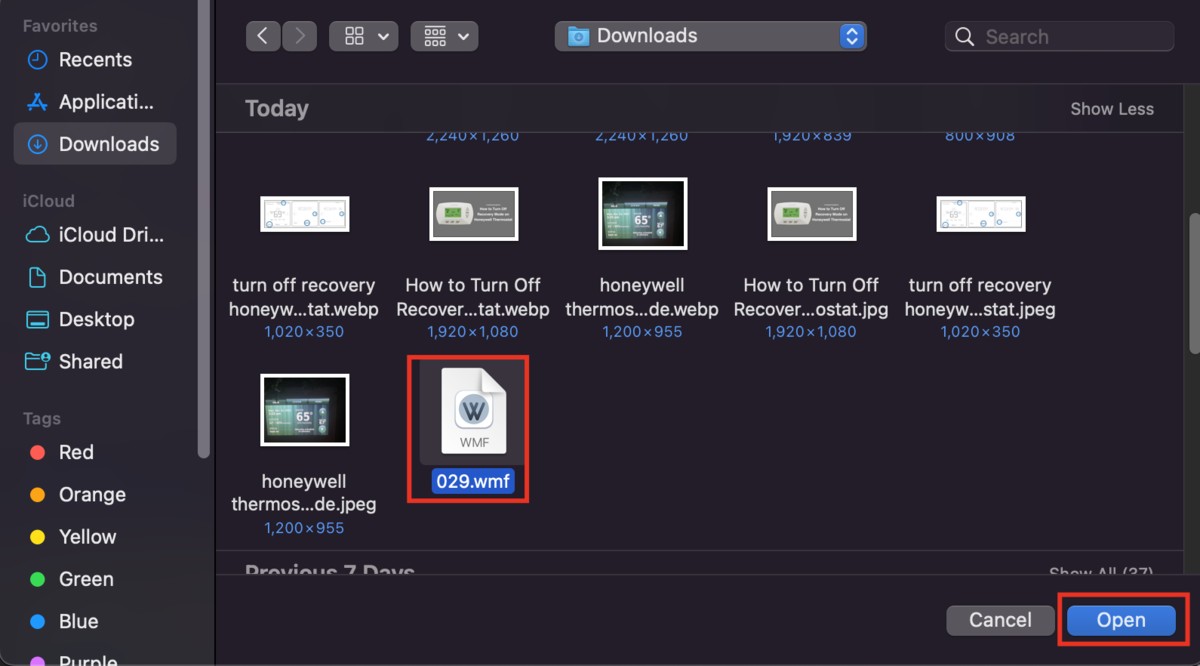
    Open WMF file
    1. Next, select the extension to which you want to convert the file.
    Convert the file
    1. Next, click on Convert. Your file will be converted and downloaded automatically.
    Output format
    1. Go to Downloads, find the downloaded converted file, and open it.

    Now, you can view the converted WMF files on your Mac and see the graphic it had. Unfortunately, you can convert only 3 files for free. If you do not want to pay and still want to open WMF files on your Mac, try the alternate method given below.

    RELATED: How to show seconds on Mac Clock

    Method 2. Use an Online Viewer to Open WMF Files on Mac

    If you want to view WMF files in bulk and the vector convertor tool has reached its limit in converting the WMF files, you can choose this alternate method to open WMF files on Mac on a browser.

    1. First, make sure that your Mac is connected to the Internet.
    2. Next, click on this link to open WMF files online.
    3. Now, in your browser, click on Browse File on the page that has opened.
    Online Viewer to Open WMF
    1. Find the WMF file that you want to open, click on it, and then click on Open.
    Open WMF file
    1. Wait for the site to process the document. After 5-10 seconds, your WMF file will open.
    2. If you want, you can save the file in PDF format as well by clicking on the Download PDF button.
    Download the PDF file

    This is how you can open WMF files on your Macbook without downloading any additional software. However, the only cons of this method is that the quality might degrade when you download the PDF.

    Conclusion

    Macbooks can not open WMF files by default because this extension was built for Windows programs. But it is not impossible to open a WMF file on a Mac.

    In this article, we explained how using the convertor tool or the online WMF viewer, you can easily view your WMF files on your Macbook, and that too for free.

    I hope that you found this article helpful. If you have any queries regarding WMF files, feel free to ask us in the comment section.

    Mac OS X macOS
    Share. Facebook Twitter Pinterest LinkedIn Tumblr Email
    Dinesh
    • Website

    Dinesh is the founder of Sysprobs and written more than 400 articles. Enthusiast in Microsoft and cloud technologies with more than 15 years of IT experience.

    Related Posts

    Fix Apple Intelligence Not Working in a macOS VM (VMware/UTM) on Windows 11/10 Host

    January 6, 2026

    Network Stack BIOS – What is it, and Should I enable it?

    December 15, 2025

    How to Install and Use Outlook for Ubuntu 24.04 LTS/24.10

    December 10, 2025

    6 Ways To Fix The “Ubuntu Software Center Not Loading” Issue

    February 29, 2024

    Find Cool & Best Mac Wallpapers (HD Desktop Backgrounds) with Free Downloads

    February 17, 2024

    How to Conduct an Outlook Search by Date

    January 30, 2024

    Comments are closed.

    Top Posts

    Network Stack BIOS – What is it, and Should I enable it?

    December 15, 2025

    250+ Funny Facebook Status/Quotes/Posts in 2026 – Free AI Creator

    December 29, 2025

    How to Install and Use Outlook for Ubuntu 24.04 LTS/24.10

    December 10, 2025
    Don't Miss

    Fix Apple Intelligence Not Working in a macOS VM (VMware/UTM) on Windows 11/10 Host

    January 6, 2026

    Apple Intelligence not showing up (or refusing to enable) inside a macOS VM is usually…

    Top Hamachi Alternatives for Virtual LAN Gaming in 2026

    January 1, 2026

    250+ Funny Facebook Status/Quotes/Posts in 2026 – Free AI Creator

    December 29, 2025

    Context Engineering vs Prompt Engineering: The Battle You Didn’t Know Was Happening

    December 29, 2025
    Stay In Touch
    • Facebook
    • YouTube
    • Twitter
    • LinkedIn
    Latest Posts

    Fix Apple Intelligence Not Working in a macOS VM (VMware/UTM) on Windows 11/10 Host

    January 6, 2026

    Top Hamachi Alternatives for Virtual LAN Gaming in 2026

    January 1, 2026

    250+ Funny Facebook Status/Quotes/Posts in 2026 – Free AI Creator

    December 29, 2025
    INFORMATION
    • About
    • Contact Us
    • Privacy Policy
    ABOUT

    Established in 2007, Sysprobs is a trusted resource for IT professionals and System Administrators. We bridge the gap between enterprise infrastructure and the future of fintech security. From Windows virtualization to Blockchain node management, we provide technical guides for the modern digital economy.

    POPULAR SECTION

    WINDOWS 11
    WINDOWS 10
    VIRTUALIZATION
    IT SECURITY
    PRO IT TIPS


    Sysprobs
    Facebook X (Twitter) YouTube LinkedIn
    • Home
    • Windows
    • Cloud
    • Security & Privacy
    © 2026 SYSPROBS: System Security & Fintech Solutions. Protected by Cloudflare.

    Type above and press Enter to search. Press Esc to cancel.