Close Menu
    What's Hot

    Fix Apple Intelligence Not Working in a macOS VM (VMware/UTM) on Windows 11/10 Host

    January 6, 2026

    Top Hamachi Alternatives for Virtual LAN Gaming in 2026

    January 1, 2026

    250+ Funny Facebook Status/Quotes/Posts in 2026 – Free AI Creator

    December 29, 2025
    Facebook X (Twitter) YouTube LinkedIn
    Facebook X (Twitter) YouTube LinkedIn
    SysprobsSysprobs
    • Tech Guides
      • Windows
        • Windows 11
        • Windows 10
        • Windows Servers
      • Virtualization
        • VirtualBox
        • VMware
        • Hyper-V
        • Server Virtualization
        • VirtualBox Images
      • PC
        • Linux
        • macOS
        • Hackintosh
        • MS Office
      • Pro IT Tips
        • Internet
        • MS Exchange
        • Fintech
    • Reviews
      • Gadgets
        • Android
        • iPhone
    • Security & Privacy
      • IT Security
    • Trading Gear
      • Laptops
    SysprobsSysprobs
    Home»Windows»Windows 10»How to Convert DMG to ISO by dmg2img in Windows 10/11 for Free

    How to Convert DMG to ISO by dmg2img in Windows 10/11 for Free

    DineshBy DineshUpdated:August 13, 2022
    Share
    Facebook Twitter LinkedIn Pinterest Email

    Mac Operating Systems use DMG files as the disk image format. It is mainly used to distribute Operating Systems and applications related to macOS.

    Opening the DMG files in Windows OS is challenging, and this guide shows how to convert the DMG to ISO by dmg2img (and other tools) for free on Windows 10/11 computer.

    Since Windows OS doesn’t support DMG files natively, we need to convert the file to known file formats or use the proper tools to extract the content. Once it is converted to ISO file format, it can be used internally or mounted to the virtual environment.

    Convert Mac DMG to ISO by DMG2IMG in Windows

    DMG2IMG is a free yet powerful command line tool to convert DMG files to ISO on the Windows platform. It will work on Windows 11/10 and older Operating Systems like Windows 8.1/7.

    1) Download dmg2img from the official site here. It has a 32-bit version only. You can still use it on your 64bit Windows 10.

    download dmg2img

    2) Installation is not required; extract the zip file. You can use any unzipping tool to extract the file.
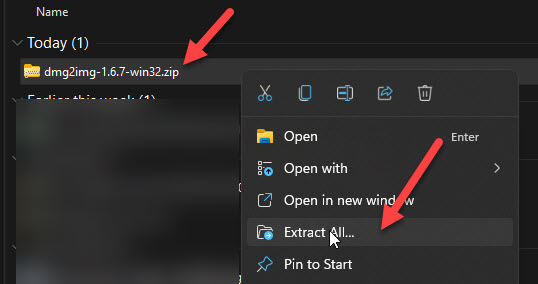
    Extract Dmg2img In Windows 11

    3) After the extraction, open the command prompt as Administrator and execute the following command.

    You must run the command from the same extracted folder with the ‘dmg2img.exe’ file. Otherwise, you need to set up the path in Windows variables.

    dmg2img < Source file.dmg> <destination file.iso>

    4) The original conversion with correct file names starts as below.
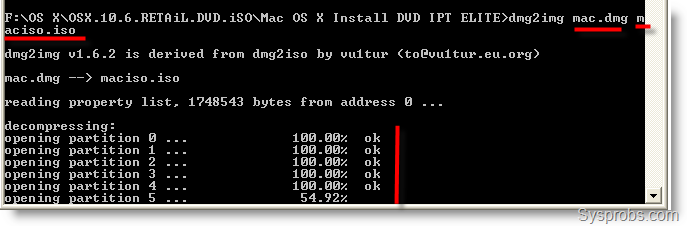
    Convert DMG to ISO in Windows

    In the end, you will get a successfully converted ISO file from DMG. This ISO can be used by any mounting software or attached to VMware or VirtualBox to boot the virtual machine. Also, it can be burned to a physical CD or DVD.

    Alternative to dmg2img.exe Tool – Power ISO

    Power ISO is a paid software mainly built for CD/DVD image file conversion. It is easy to use as it has a graphical user interface. You can consider Power ISO as the best option if you regularly convert these files for production or testing environments.
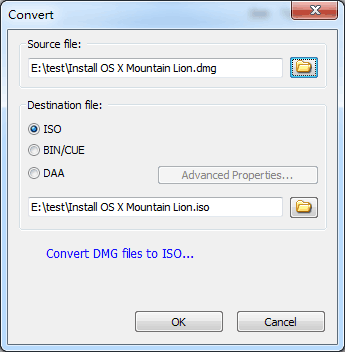
    Use PowerISO

    You can visit their home page to find more information and download it.

    Some other GUI tools (with the graphical interface) are available, but they are not free. I find that the dmg2img free tool does the job well, and the converted ISO file worked in most of the software and Operating Systems.

    7-Zip Program

    The famous compression and decompression tool 7-Zip can read the content of the DMG file in Windows 11. You can use it to extract the content. Then create the same content to make ISO file from it.

    ISO Workshop

    ISO Workshop is another alternative and free tool for the dmg2img tool. It can work well on most Windows Operating Systems to convert DMG to ISO for free.

    It is a GUI tool which is easy to follow the steps. You can download the tool from the official website here.

    Mac on Windows
    Share. Facebook Twitter Pinterest LinkedIn Tumblr Email
    Dinesh
    • Website

    Dinesh is the founder of Sysprobs and written more than 400 articles. Enthusiast in Microsoft and cloud technologies with more than 15 years of IT experience.

    Related Posts

    Top Hamachi Alternatives for Virtual LAN Gaming in 2026

    January 1, 2026

    How to Delete NVIDIA MessageBus Logs in Windows 11/10

    June 21, 2025

    How to Set 12-Hour Clock in Windows 10/11 (From 24-hour)

    June 9, 2025

    Find Cool & Best Mac Wallpapers (HD Desktop Backgrounds) with Free Downloads

    February 17, 2024

    11 Games like Overwatch you Must Play in 2024

    January 16, 2024

    How to Show This PC on Desktop – Windows 11/10

    December 28, 2023

    41 Comments

    1. obaid on January 16, 2018 7:07 am

      can I make a bootable usb for mac from the ISO file? so that I can install it on my Macbook?

      • v1adimir on May 21, 2018 2:06 pm

        That’s the main thing, man… So many articles, web sites and “instructions” and **NONE** of ’em are gonna tell us HOW to plug in a USB drive into the Mac and (re)install the macOS!? o.0

    2. Albert on January 26, 2018 9:50 am

      I’m not super savvy with the command line so I had to look up a few things and also change my source’s filename, but I did get this to work. Thank you!

    3. ilias on July 16, 2018 10:23 pm

      Am im mistaking that it just putting the .dmg INSIDE new .iso ? (do not converting anything)

    4. xela on April 18, 2020 7:02 pm

      thank you fo the help

    ← Older Comments
    Top Posts

    Network Stack BIOS – What is it, and Should I enable it?

    December 15, 2025

    250+ Funny Facebook Status/Quotes/Posts in 2026 – Free AI Creator

    December 29, 2025

    How to Install and Use Outlook for Ubuntu 24.04 LTS/24.10

    December 10, 2025
    Don't Miss

    Fix Apple Intelligence Not Working in a macOS VM (VMware/UTM) on Windows 11/10 Host

    January 6, 2026

    Apple Intelligence not showing up (or refusing to enable) inside a macOS VM is usually…

    Top Hamachi Alternatives for Virtual LAN Gaming in 2026

    January 1, 2026

    250+ Funny Facebook Status/Quotes/Posts in 2026 – Free AI Creator

    December 29, 2025

    Context Engineering vs Prompt Engineering: The Battle You Didn’t Know Was Happening

    December 29, 2025
    Stay In Touch
    • Facebook
    • YouTube
    • Twitter
    • LinkedIn
    Latest Posts

    Fix Apple Intelligence Not Working in a macOS VM (VMware/UTM) on Windows 11/10 Host

    January 6, 2026

    Top Hamachi Alternatives for Virtual LAN Gaming in 2026

    January 1, 2026

    250+ Funny Facebook Status/Quotes/Posts in 2026 – Free AI Creator

    December 29, 2025
    INFORMATION
    • About
    • Contact Us
    • Privacy Policy
    ABOUT

    Established in 2007, Sysprobs is a trusted resource for IT professionals and System Administrators. We bridge the gap between enterprise infrastructure and the future of fintech security. From Windows virtualization to Blockchain node management, we provide technical guides for the modern digital economy.

    POPULAR SECTION

    WINDOWS 11
    WINDOWS 10
    VIRTUALIZATION
    IT SECURITY
    PRO IT TIPS


    Sysprobs
    Facebook X (Twitter) YouTube LinkedIn
    • Home
    • Windows
    • Cloud
    • Security & Privacy
    © 2026 SYSPROBS: System Security & Fintech Solutions. Protected by Cloudflare.

    Type above and press Enter to search. Press Esc to cancel.