


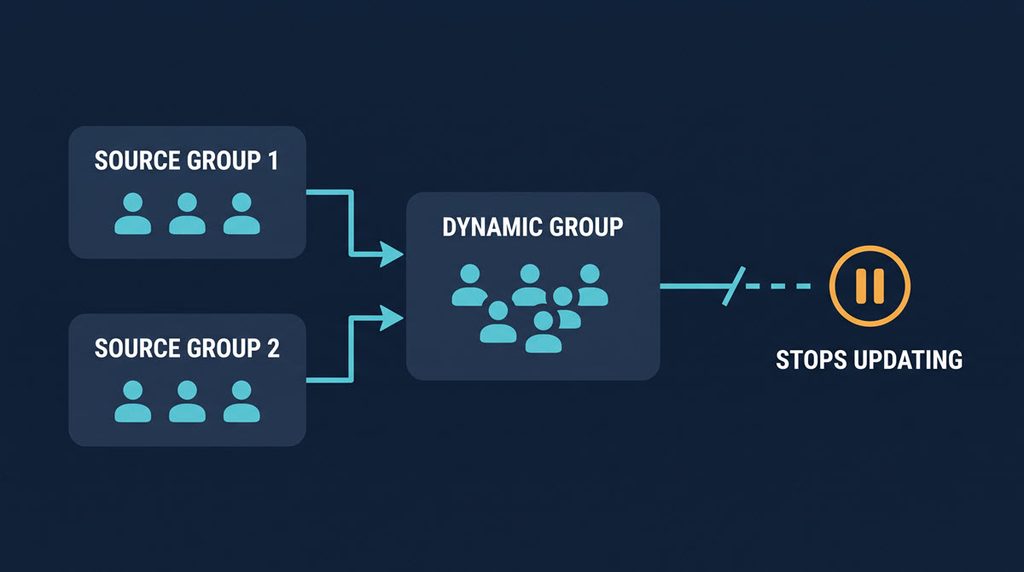
If you built an Entra dynamic group with the memberOf operator to get “nested groups”, that group stops updating after 3 November 2026. It keeps whatever membership it had on that day, and nothing adds or removes users after it. In this guide, I’ll show how to find every memberOf rule in your tenant, then replace it with an attribute rule or convert the group to assigned membership.
After 3 November 2026, Entra dynamic groups that use the memberOf operator stop updating and keep their last membership. Export your dynamic groups, find rules containing memberOf, then replace them with attribute rules or convert them to assigned membership. Check administrative units and auto-assignment policies with Graph PowerShell.
The same applies to dynamic administrative units and to entitlement management auto-assignment policies, and each is checked in a different place. Most guides stop at “review your groups”. This one goes object by object.
You need at least the User Administrator role to edit memberOf group rules, and Entra ID P1 or P2 for dynamic groups. Auto-assignment policies also need an Entra ID Governance or Entra Suite licence, and the Identity Governance Administrator role to edit them.
What Stops on 3 November and What It Breaks
The memberOf operator retirement comes from the end of a public preview on 3 November 2026. Microsoft says memberOf slowed dynamic membership processing for all groups in a tenant, and it was never meant for production. Three things are affected:
- dynamic membership groups (user and device)
- dynamic administrative units
- entitlement management auto-assignment policies
After the date they stop processing and stay in the last known state. Microsoft lists what that means in practice: new joiners may miss access or licences, people who left may keep them, Conditional Access policies that target the group use old membership, and Teams, SharePoint and group-based licensing get stale data.
Nothing errors and nothing alerts. A new starter simply never lands in the group.
Auto-assignment policies are handled more strictly. Microsoft says they are quarantined: the policy stays, but no assignments are added or removed until memberOf is removed from the rule. One article I read gives 27 October for policies, but the Microsoft Learn page says 3 November, so I would not wait for the last day either way.
There is no drop-in replacement. Microsoft says it is working on an alternative and gives no date. That matters for the decision later in this post.
How to Find Entra Dynamic Groups That Use memberOf
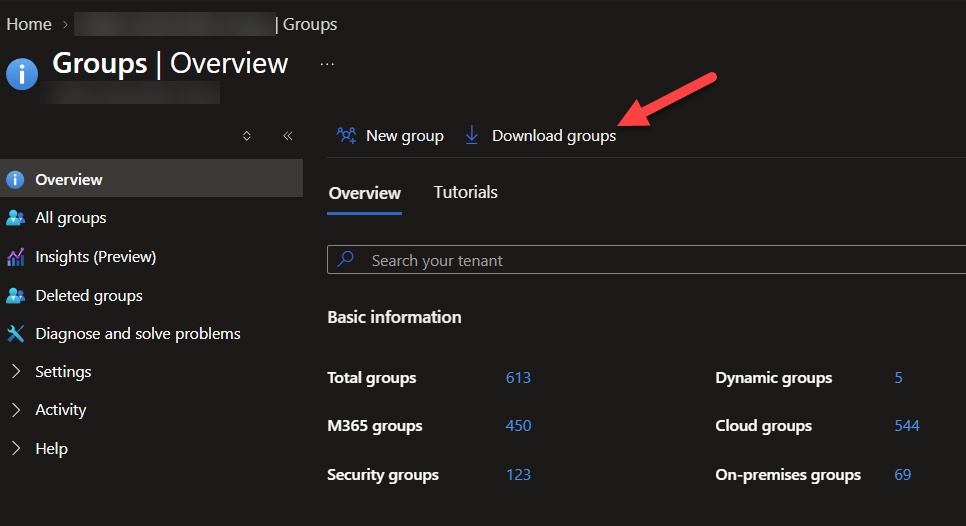
Start in the admin center. Go to Entra ID > Groups > All groups and select Download groups. Give the file a name, start the bulk operation, then open the success notification and download the CSV.
Here is the gap. The file has Object ID, Display name, Mail, Group type and Membership type, but not the membership rule. So the export only tells you which groups are dynamic. You still have to read each rule, which is fine for 10 groups and painful for 200.
For a real tenant, use Microsoft Graph PowerShell. This needs the Microsoft Graph module (I covered the install and sign-in in my Microsoft Graph PowerShell tutorial) and the read-only Group.Read.All permission.
Connect-MgGraph -Scopes "Group.Read.All"

Get-MgGroup -All -Property Id,DisplayName,GroupTypes,MembershipRule,MembershipRuleProcessingState |
    Where-Object { $_.MembershipRule -match '(?i)memberof' } |
    Select-Object Id, DisplayName, MembershipRule, MembershipRuleProcessingState |
    Export-Csv .\memberof-groups.csv -NoTypeInformation
Static groups have no rule, so they drop out of the filter. Each row you get is a group to deal with, and the rule text shows which source group IDs it reads from. Microsoft documents that membershipRule can be filtered on the server side too, but I filter locally here because it is simple and works on any tenant size.
For dynamic administrative units, the same idea works with the administrative unit cmdlet. The membership properties come back by default.
Connect-MgGraph -Scopes "AdministrativeUnit.Read.All"

Get-MgDirectoryAdministrativeUnit -All |
    Where-Object { $_.MembershipRule -match '(?i)memberof' } |
    Select-Object Id, DisplayName, MembershipType, MembershipRule
For auto-assignment policies, use the read-only script Microsoft published on its auto-assignment policy page. It lists the assignment policies, keeps the automatic ones, checks each rule for memberOf and writes a CSV, even when nothing matches. It needs the EntitlementManagement.Read.All permission.
Before you touch anything, write down what each group controls: a licence, a Teams team, a Conditional Access policy or an access package. Groups that feed licensing and Conditional Access come first.
Can You Replace memberOf With Another Operator?
Sometimes. It depends on how the source group is filled.
memberOf says “everyone in group X”. If group X is itself built from an attribute (all users with department Finance, all devices owned by the company), you can skip the middle step and write the attribute rule directly. If group X is a hand-maintained list, no attribute describes it, and you cannot rebuild it with a rule.
This table is how I would sort each group you found:
| Source group is filled by | What to do |
|---|---|
| An attribute (department, country, job title, extension attribute) | Replace with an attribute rule |
| An attribute, but the data is missing or messy | Fix the attribute first, then replace |
| People adding users by hand | Convert to assigned membership |
| Several mixed groups combined | Convert to assigned, or plan another method such as a script or access package |
| An auto-assignment policy with no equivalent rule | Plan another assignment method before removing the policy |
Here is a rewrite. Say a group used memberOf with three source groups, and each source group was really “department X”. The memberOf rule looked like this:
user.memberof -any (group.objectId -in ['<groupObjectId1>', '<groupObjectId2>', '<groupObjectId3>'])The replacement reads the attribute directly:
user.department -in ["Finance", "Procurement", "Legal"]Use -in for several values instead of chaining -or, and prefer -eq over -match or -contains. Microsoft’s own guidance puts -eq first, then -startsWith and -endsWith, because -match and -contains slow processing for the whole tenant (the same problem that ended memberOf). Entra dynamic group rule syntax is picky: property names are case sensitive, and the rule body can be at most 3,072 characters.
One more check before you rely on an attribute. A dynamic rule is only as safe as whoever can write that attribute. If users can edit their own value, or it syncs from on-premises Active Directory with weak permissions, a user could add themselves to a group that grants access. Microsoft calls this out, and I would take it seriously for anything tied to Conditional Access.
To change the rule in the portal, open the group and edit its dynamic query. Then wait, and compare (see the validation section below).
When You Cannot Replace It: Convert Dynamic Group to Assigned
If no attribute describes the membership, convert the group to assigned. This is the honest answer for a lot of “nested group” setups, because that is what a hand-maintained group really is.
In the admin center, open the group, go to Properties and change Membership type to Assigned (static). You need at least the Groups Administrator role. In PowerShell, Microsoft’s example removes the DynamicMembership value from the group types and pauses rule processing:
Connect-MgGraph -Scopes "Group.ReadWrite.All"

$group = Get-MgGroup -GroupId "<groupObjectId>"
$types = @($group.GroupTypes | Where-Object { $_ -ne "DynamicMembership" })

Update-MgGroup -GroupId $group.Id -GroupTypes $types -MembershipRuleProcessingState "Paused"
The group keeps its name and ID, so licences, Conditional Access policies and app assignments pointing at it keep working. Its members at that moment stay as they are.
What you lose is the automatic part. Someone now owns joiners, movers and leavers for that group. If nobody does, you have just moved the stale membership problem from Microsoft’s side to yours. Put an owner on the group before you convert it, and make the owner a person, not a shared mailbox nobody reads.
Dynamic Administrative Units and Auto-Assignment Policies
The two behave differently from groups, so check them separately.
Dynamic administrative units. If an Entra dynamic administrative unit has memberOf in its rule, it freezes the same way a group does. In the admin center these units live under Entra ID > Roles & admins > Admin units. Open the unit, then Properties, and set Membership type to Assigned. Entra warns you that the rule will no longer be processed, and the current members stay. You need the Privileged Role Administrator role for this. With PowerShell, Microsoft’s example is Update-MgDirectoryAdministrativeUnit with membershipType = "Assigned" and membershipRuleProcessingState = "Paused". Dynamic administrative units cannot mix users and devices, so a replacement rule has to stay with one type. After the change, check both who is in the unit and which admin roles are scoped to it, because a stale unit means stale admin scope.
Auto-assignment policies. Go to ID Governance > Entitlement management > Access package, open the access package, and select Policies. Edit the policy’s rule and rebuild it with supported operators. If no supported rule covers it, do not delete the policy first. Microsoft says to plan another assignment method before removing it, otherwise people lose their access package assignments. Once memberOf is out of the rule, the quarantine lifts and processing resumes. Policies that never used memberOf are not affected.
Validate Before You Clean Up
Never swap a rule and walk away. Dynamic membership is not instant, and a rule that is slightly wrong removes people from groups that control access.
Take a list of members before the change:
Get-MgGroupMember -GroupId "<groupObjectId>" -All |
    Select-Object -ExpandProperty Id | Sort-Object | Set-Content .\before.txt
Make the change, give the rule time to process, then run the same command into after.txt and compare:
Compare-Object (Get-Content .\before.txt) (Get-Content .\after.txt)Every difference needs an explanation. People who should have been added are fine. People removed who should not have been means the new rule is wrong. If the group is a device group, expect IDs to be device objects. Get-MgGroupMember lists direct members only, which matches how memberOf worked for security groups, so the two lists compare like for like.
Then check what the group feeds. Look at group-based licensing for errors, open the Conditional Access policies that target the group and confirm the targeting still makes sense, and check Teams or SharePoint access for a couple of users who moved.
When a group is no longer needed, pause it or delete it. I prefer pausing first and deleting a few weeks later, once nobody has complained.
What If You Miss the Date
If you find a memberOf group after 3 November, it is frozen, not broken. Nothing was deleted. The membership shows who was in it on the day it stopped.
To spot stale groups, run the scripts above, then compare a handful of recent joiners and leavers against what the group shows. A new starter missing, or someone who left in November still listed, is the sign. Groups tied to licences show it first, as unlicensed new users or leftover licences on people who left.
Fix it the same way: replace the rule or convert to assigned, then validate. For auto-assignment policies, the fix is explicit in Microsoft’s text: processing stays stopped until memberOf is removed from the rule.
I could not find a Microsoft statement on whether you can still edit a frozen dynamic group or administrative unit after the date, or how fast it reprocesses, so I would test one group first rather than trust a guess.
FAQ
What happens to memberOf dynamic groups after 3 November?
They stop updating and keep their last known membership. The same applies to dynamic administrative units and auto-assignment policies that use memberOf. The effect is stale access, licences and Conditional Access targeting, not an error message.
Is there a replacement for the memberOf operator?
Not today. Microsoft says it is developing an alternative but has not named one. Until then, replace the rule with attribute-based operators where the source group is built from an attribute, or convert the group to assigned membership.
Does this affect Conditional Access and licensing?
Yes, if the group is used there. Microsoft lists Conditional Access targeting and group-based licensing as affected, since both read the group’s membership, and that membership is now frozen.
Can I use NOT memberOf to exclude a group?
No. Even in preview, memberOf could not be combined with other operators or rules, so “members of A but not B” was never supported. Build that logic with attributes, or with an assigned group.
