


Windows 12 isn’t announced yet, but leaks and spec rumors keep piling up, and they’re not small bumps from Windows 11. We’re talking double the RAM baseline, mandatory SSDs, and NPU requirements that knock out most machines from the last few years. Most people asking “will my PC run it?” are about to find out the answer is no, not without spending money.

Microsoft already burned users with Windows 11’s TPM 2.0 gate, locking out perfectly functional hardware. Windows 12 is shaping up to be worse. The minimum RAM spec floated around is 8GB, but several leaks suggest 16GB as the real minimum once AI features get baked in. If you’re running 4GB or even 8GB, you’re going to hit a wall fast.
Windows 12 will likely demand 8GB RAM minimum, 16GB for AI features, an NPU-capable processor (Intel 12th Gen or AMD Ryzen 5000+), and a mandatory SSD. Machines without an NPU will either lose core functionality or won’t upgrade at all. TPM 2.0 and Secure Boot remain mandatory.
What makes Windows 12 different from Windows 11
Windows 11 introduced TPM 2.0 and Secure Boot as hard requirements, shutting out CPUs older than Intel 8th Gen (roughly pre-2018 chips). Windows 12 keeps those gates but adds more. The big change is the Neural Processing Unit – an NPU, which handles AI tasks locally instead of shipping data to the cloud.
Intel’s 12th Gen and newer Core processors, plus AMD’s Ryzen 5000 and newer series, have NPUs built in. If your chip doesn’t have one, you lose AI-driven features like real-time transcription, image generation, and whatever Copilot features Microsoft decides to force into the OS.
The RAM jump is the other problem. Windows 11 technically runs on 4GB, though anyone who’s tried it knows that’s a nightmare. Windows 12 appears to double that to 8GB minimum, with 16GB recommended. Leaks from internal documentation point to 16GB being the actual floor if you want AI features turned on. And since Microsoft is betting the company on AI integration, good luck using Windows 12 without those features enabled.
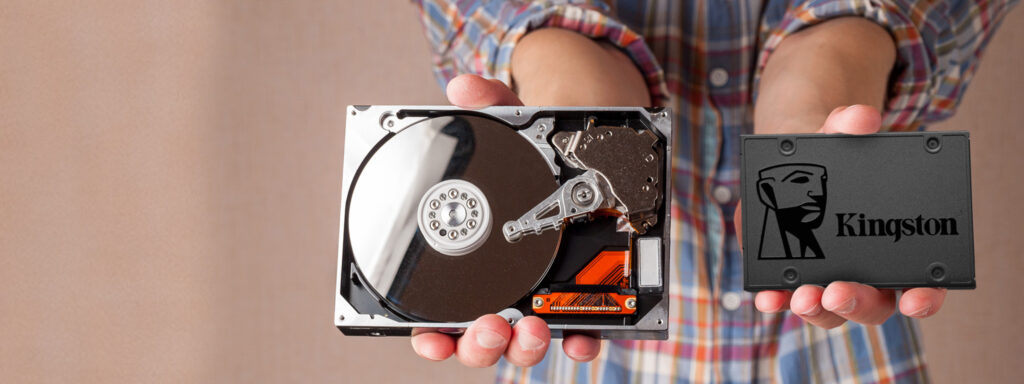
Storage requirements are also tightening. SSDs are no longer optional, HDDs won’t cut it. The expected minimum is 64GB to 128GB of SSD space, which rules out older budget laptops still limping along on spinning disks.
NPU: the new gatekeeper
The NPU requirement is where things get messy. An NPU, or Neural Processing Unit, is a dedicated chip inside modern processors designed to run machine learning models without hammering the CPU or GPU. Intel’s 12th Gen Core chips and later, plus AMD’s Ryzen 5000 series and up, come with NPUs that hit at least 40 TOPs (trillions of operations per second). Windows 12 appears to be setting 40 TOPs as the bar for “AI-ready.”
If your chip doesn’t have an NPU, or has a weak one under 40 TOPs, you’ll still be able to install Windows 12 – maybe. But you won’t get the full feature set. Real-time background blur in video calls, local LLM queries, image upscaling, voice transcription -all that will either fall back to cloud services (slower, privacy concerns) or just not work. Microsoft has been pushing Copilot hard, and Windows 12 will likely tie core OS functions to it. No NPU means a crippled experience.
Here’s what qualifies:
- Intel: 12th Gen Core (Alder Lake) and newer, especially Core Ultra series
- AMD: Ryzen 5000 series and up, with Ryzen AI 300 series hitting the sweet spot
- Qualcomm: Snapdragon X series for ARM-based PCs
Anything older? You’re out. And that includes a lot of gaming rigs built around Intel 10th or 11th Gen chips that still crush games but lack NPUs.
RAM: 8GB minimum, 16GB real minimum
Windows 12’s official minimum RAM spec is expected to be 8GB, double Windows 11’s 4GB floor. But if you’ve run Windows 11 on 4GB, you know it’s unusable. The same will be true for 8GB on Windows 12, especially once AI features start chewing memory in the background. Leaked internal docs suggest 16GB as the recommended baseline for AI features, and that’s probably the real minimum for a decent experience.
Why the jump? AI models running locally are memory-intensive. Even small language models need several gigabytes just to load. Background services like real-time transcription, predictive text, or image recognition all stack on top of normal OS overhead. Throw in a browser (easily 2-4GB), a few apps, and maybe a game, and 8GB is gone before you’ve done anything.
Storage: SSD mandatory, HDD dead
Windows 12 will not support HDDs for the OS drive. SSDs are mandatory, with the expected minimum somewhere between 64GB and 128GB. This isn’t new, Windows 11 heavily favored SSDs, but Windows 12 makes it a hard rule. The OS relies on fast storage for features like DirectStorage, instant-on, and background AI indexing. HDDs are too slow.
TPM 2.0 and Secure Boot: still required
Windows 12 keeps the TPM 2.0 and Secure Boot requirements from Windows 11. TPM 2.0 is a hardware security chip used for encryption, secure boot verification, and BitLocker. Secure Boot ensures only trusted software runs during startup, blocking rootkits and bootkits. Both are mandatory.
Processor requirements: 2018 or newer
Windows 12 will likely require CPUs from 2018 or later, same as Windows 11. That means:
- Intel: 8th Gen Core or newer
- AMD: Ryzen 2000 series or newer
Anything older doesn’t support the required instruction sets or security features Microsoft wants. And again, even if your CPU is from 2018, it still needs an NPU to unlock AI features.
Graphics: DirectX 12 Still the Floor
DirectX 12 compatibility is still required, same as Windows 11. This is mostly a non-issue and any GPU from the last decade supports DX12. NVIDIA GTX 1650 or equivalent is floated as the baseline for smooth performance, but older cards like the GTX 1050 or AMD RX 560 will still technically work.
If you’re gaming or doing AI-assisted creative work, a dedicated GPU helps. NPUs handle some AI tasks, but GPUs still dominate for image generation, video editing, and heavy model inference. A GTX 1650 is the bare minimum; something like an RTX 3060 or RX 6600 is the real sweet spot.
Can You Upgrade, or Do You Replace?
If your PC is from 2020 or later and you have 16GB of RAM, an SSD, and a recent Intel or AMD chip, you’re probably fine. But if you’re on an older machine with 8GB RAM, HDD, no NPU, you’re looking at either a major upgrade or a full replacement.
Upgrade path:
- Add 16GB RAM (if your motherboard supports it)
- Swap HDD for a 500GB NVMe SSD
- Check BIOS for TPM 2.0 and Secure Boot support
- Cross your fingers your CPU has an NPU
Replacement path:
If your CPU is pre-2020 or lacks an NPU, upgrading the motherboard and CPU starts to cost as much as a new machine. At that point, buying a prebuilt with an Intel 12th Gen or AMD Ryzen 5000+ chip, 16GB RAM, and an SSD is the smarter move.
The verdict
Windows 12 is designed for new hardware. Microsoft wants people on NPU-equipped chips, 16GB of RAM, and SSDs. If you’re not there, you’re either upgrading piecemeal or sitting out the release.
Check your specs now. If you’re on 8GB RAM, plan to upgrade. If you don’t have an NPU, decide whether you care about AI features. And if you’re still on an HDD, swap to an SSD regardless of Windows 12 – it’s the single biggest performance boost you can buy for cheap.
Most people won’t meet these specs without spending money. But that’s the play: Windows 12 is Microsoft’s excuse to push everyone onto newer hardware, whether they need it or not.
FAQ
Will Windows 12 run on 8GB of RAM?
Technically yes, but it’ll struggle. The minimum is expected to be 8GB, but 16GB is the real floor if you want AI features enabled. Background services and local AI models eat memory fast.
Do I need an NPU to run Windows 12?
Not to install it, but you’ll lose most AI-driven features without one. Copilot, real-time transcription, local image generation and all require an NPU with at least 40 TOPs. Intel 12th Gen or AMD Ryzen 5000+ chips have the right hardware.
Can I upgrade my old PC to meet Windows 12 requirements?
Maybe. If your motherboard supports TPM 2.0, you can enable it in BIOS. You can add RAM and swap to an SSD. But if your CPU is older than 2018 or lacks an NPU, you’re stuck. At that point, replacing the whole machine is cheaper than upgrading the motherboard and CPU.
Will Windows 12 support HDDs?
No. SSDs are mandatory for the OS drive. HDDs are too slow for features like DirectStorage and instant-on. If you’re still on an HDD, you’ll need to swap to an SSD before upgrading.
