


Lose a wallet, and the first thing you might worry about is the cash inside it. But practically, the cash is usually the smallest part of your headache. It is canceling every credit card, watching your statements for fraud, replacing your driver’s license, and hoping nobody uses your ID to open something in your name before you get to the bank. The wallet itself is less valuable than what it unlocked.

A missing corporate laptop or smartphone follows the same math, at a much bigger scale. According to IBM’s Cost of a Data Breach Report 2026, the global average cost of a data breach hit a record $4.99 million this year, up 12% from last year. In the United States, the average was $11.5 million, more than double the global figure. A lost or stolen device that gives bad actors a way into corporate systems can trigger exactly that kind of breach, and the hardware replacement cost barely registers next to it.
What your device actually unlocks
Financial reporting typically books a missing device as a capital write-off—the price of a new laptop or phone. That’s your wallet and the cash. A modern endpoint is an authenticated gateway to corporate cloud databases, customer records, intellectual property, and internal communication channels. That’s your ID and credit cards. When your device disappears, the hardware is the smallest part of what is actually at risk. What follows—forensic investigation, credential revocation, regulatory scrutiny, and possible breach notification—is what drives the real bill.
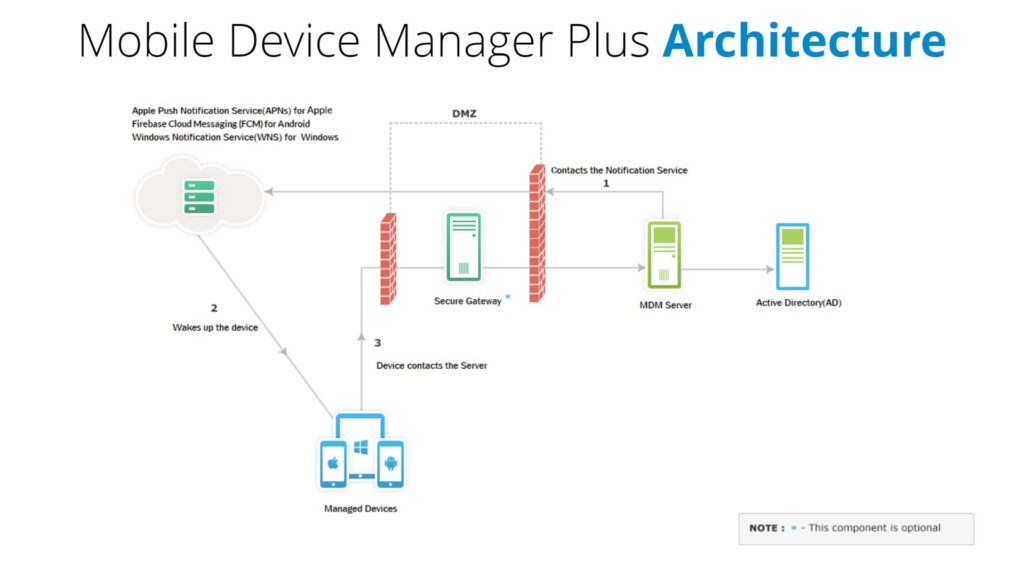
This is also where mobile device management (MDM) earns its keep. ManageEngine Mobile Device Manager Plus enforces encryption, access, and wipe policies on every enrolled device before a loss ever happens. This makes the answer to Was this device protected? a yes, regardless of whether the user had good habits.
The hidden costs of a lost device
A missing device rarely stays a hardware problem for long. What decides whether it’s a footnote or a full breach is what state it was in when it went missing, and how fast that state can be proven.
Regulatory penalties and mandatory disclosure
Under data privacy rules like the GDPR, HIPAA, and the CCPA, losing a device that holds or can reach unencrypted personal data counts as an official breach—whether or not anyone ever actually opens it.
The GDPR gives organizations 72 hours to report a breach once they become aware of one. Meeting that window means already having proof of the device’s encryption status and access logs on hand, not assembling it after the fact. Fines under these frameworks scale with company revenue and the number of records exposed, not with what the hardware itself cost. Under the GDPR, they can run into the millions for serious violations. Mobile Device Manager Plus enforces device-level encryption policies and keeps audit trails of that compliance state, so the proof a regulator asks for at hour 71 is already sitting in the console rather than being pieced together after the fact.
Digital forensics and incident response
When a loosely tracked device goes missing, security teams must assume the data on it is unsafe, just as you would assume a lost wallet was opened. They typically need to work out:
- What sessions were active on the device when it went missing.
- Whether local data was encrypted with hardware-backed keys.
- Whether any unauthorized network activity happened afterward.
Without instant, auditable proof of encryption and device state, answering those questions usually means calling in external forensic specialists and treating the loss as an open investigation instead of a closed one. Mobile Device Manager Plus keeps a per-device inventory record, including encryption status, security settings, certificates, and last known location—answering most of those initial questions before a forensics team is even called.
Session hijacking and credential exposure
Security failures today tend to center on live sessions rather than a cracked passcode, in the same way a stolen unlocked phone is far more dangerous than a stolen locked one. An unlocked or unencrypted device can hand an attacker:
- Active single sign-on (SSO) browser sessions.
- Cached API keys, tokens, and corporate email accounts.
- Multi-factor authentication (MFA) apps installed directly on the phone.
If an attacker rides those sessions into cloud infrastructure, one lost device can turn into a full-scale breach—the kind reflected in IBM’s multi-million-dollar averages above—instead of staying a line item on an asset register. This is the point where a remote lock or a remote wipe issued from the MDM console, rather than a support ticket waiting on the user to notice something is wrong, decides how far that exposure gets to spread.
Unmanaged loss vs. managed loss
| Impact category | Unmanaged or ad-hoc managed device | Device managed with Mobile Device Manager Plus |
| Hardware loss | Replacement cost only. | Replacement cost only. |
| Incident response | External forensic validation required to prove data was protected. | Device inventory and audit trails provide immediate proof of encryption and device status. |
| Credential revocation | Manual IT effort across each connected application. | Remote lock, wipe, and profile revocation issued from the console |
| Regulatory exposure | Higher risk of mandatory breach notification and fines. | Safe Harbor protection where verifiable full disk encryption is enforced and logged. |
| Data recovery or wipe | Depends on the device being recovered or the user responding. | Remote corporate wipe triggered by IT within minutes. |
The case for automated endpoint governance
Cutting the real cost of a lost device means moving from reactive IT ticketing to automated device life cycle management; the equivalent of having your bank’s fraud line on speed dial instead of digging through a drawer for the number. A few specific Mobile Device Manager Plus capabilities do that work directly:
Verifiable encryption for Safe Harbor. Several privacy laws include Safe Harbor provisions: if an organization can prove a missing device had active, hardware backed encryption, the incident is often exempt from mandatory public breach notification and the penalties attached to it. Mobile Device Manager Plus enforces and logs that encryption state as a standing policy, not a one-time checkbox at enrollment.
Instant remote sanitization. IT teams can trigger an immediate, over-the-air corporate wipe through Mobile Device Manager Plus that purges enterprise apps, corporate email, VPN configurations, and sensitive local files, while leaving personal files intact on BYOD hardware.
Automated lost mode and geo-tracking. For rugged and field devices, Mobile Device Manager Plus provides both historic and real-time location tracking, and lockdown profiles that display a recovery contact on the screen, restrict peripheral access, and can trigger a passcode reset, alarm, or factory reset if the device turns up outside its authorized zone.
Closing note
Losing a wallet is never really about the wallet, and losing a work device is never really about the device. What matters is everything it could unlock on the way out the door: sessions, credentials, regulated data, and trust. The gap between an unmanaged loss and a proactively managed one is not a single feature. It is encryption enforced ahead of time, an inventory record ready before anyone asks for it, and a remote wipe that fires in minutes instead of a support ticket that waits on the user to notice.
Mobile Device Manager Plus builds all three of those into one console, so hardware loss stays an isolated equipment expense instead of the start of a costly security incident.
See how quickly you could recover a lost device. Get a demo of ManageEngine Mobile Device Manager Plus.
Contributed by: Karan Shekar
About the author: Karan Shekar is a Product Specialist at ManageEngine in the Unified Endpoint Management suite. With a strong background in Endpoint Security and Management, his expertise is in creating technical long-form content for enterprise IT professionals, focusing on actionable solutions and insights within the Unified Endpoint Management space.
