


Windows 11 26H2 is mostly a version number. The install is tiny, the restart is one, and the thing you really get is a fresh support clock. That makes it an easy yes for some PCs and a “pilot it first” for others, and the difference is almost always home versus company network.
In this guide, I’ll cover what 26H2 changes, every way to get it, why it may not show up, and what to check before you roll it out.
Windows 11 26H2 is an enablement package (KB5121794) for PCs already on 24H2 or 25H2. It installs with one restart and resets support to 24 months for Home and Pro, 36 months for Enterprise and Education. Install it on home PCs after a quick known-issue check. On company networks, pilot first, because Machine Identity Isolation can break domain trust.
Windows 11 26H2 in Plain Words
26H2 is not a new operating system build you download and set up. Microsoft shipped the code inside the monthly updates for 24H2 and 25H2, switched off. The enablement package, KB5121794, is the switch. It needs 24H2 or 25H2 with KB5124010 or a later update already installed.
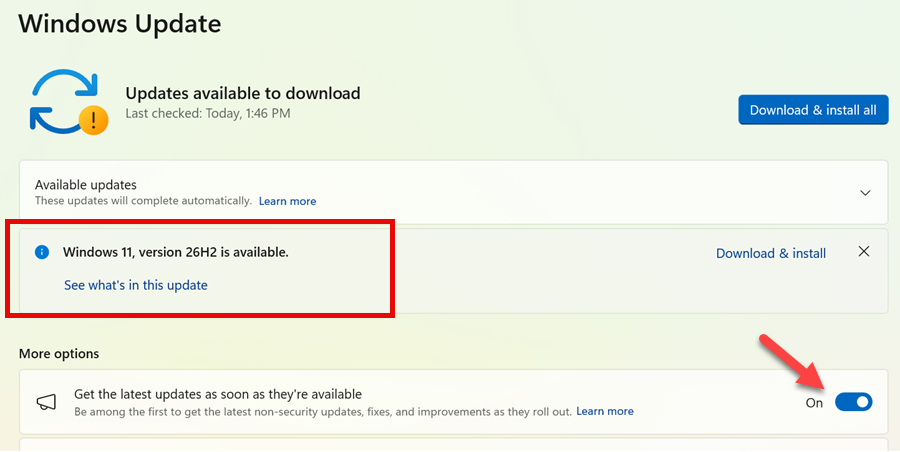
The detail I would not skip in Microsoft’s release table is that the build number moves. 24H2 is build 26100, 25H2 is 26200, and 26H2 is 26300. If an inventory report, a compliance script or a vendor support matrix checks for a specific build, it needs a look.
| Version | Build | End of updates, Home and Pro | End of updates, Enterprise and Education |
|---|---|---|---|
| 26H2 | 26300.9550 | 10 October 2028 | 9 October 2029 |
| 25H2 | 26200.9550 | 12 October 2027 | 10 October 2028 |
| 24H2 | 26100.9550 | 13 October 2026 | 12 October 2027 |
These dates and builds come from Microsoft’s Windows 11 release information page. Builds keep moving with each monthly update, so treat the table as the starting point.
One more limit. Windows 11 26H1 (build 28000) is a separate branch for new devices only. It is not offered as an in-place update from 24H2 or 25H2, and a 26H1 device cannot move to 26H2. If you manage new hardware, check its version before you plan anything.
What Is Actually Different After Windows 11 26H2
For a home user, not much. Microsoft’s own wording is that 26H2 contains the features already announced for 24H2 and 25H2. If your PC took the monthly updates, you have most of it.
For managed PCs there is a real change. Three things that Microsoft kept behind temporary enterprise controls are now on by default: Windows settings backup, app-specific taskbar actions and the File Explorer improvements. That comes from message center post MC1482225. If you did not want those on, decide before the pilot, not after the helpdesk calls. The policy that controls held-back features is in the admin section below.
Tech press roundups list more: Administrator Protection, built-in Sysmon, post-quantum cryptography support, Point-in-time restore. Several of those are off by default, and none of that list came from a Microsoft page I could open, so read Microsoft’s IT pro guide for 26H2 before you promise any of it to your users.
My view of the good and the bad:
- The install is small and quick. Windows Latest reported a download of about 174 KB for a patched PC, and Microsoft says one restart completes it.
- The support reset is the real prize. A PC on 25H2 gets to October 2028 instead of October 2027, with no reinstall.
- The build number change and the default-on features are the two things that can surprise a company network.
- The September servicing brought four open known issues, and they also hit 24H2 and 25H2. Moving to 26H2 does not cause them, but it does not avoid them either.
Home PC: Install Now or Wait?
If the PC is on 24H2 Home or Pro, install it. Updates for that version end on 13 October 2026, and the move costs you a small download and one restart.
If it is on 25H2, you have until 12 October 2027, so there is no rush. I would still install it within a few weeks, after two quick checks.
First, do you use a USB headset, DAC or audio interface? Microsoft lists a known issue where some USB Audio Class 1.0 devices show Code 10 or give no sound. Second, do you run older games or media players? Applications that need AC-3 (Dolby Digital) decoding can close unexpectedly after the September update, and Microsoft has not shipped a fix yet.
Take a backup before you start. A full image of the drive means you never have to guess what changed. This full backup guide covers it.
If the PC is still on Windows 10, 26H2 is not an in-place patch for you. See what to do with Windows 10 ESU first and decide whether the hardware can run Windows 11 at all.
Company Network: Pilot Before You Roll Out
For managed PCs, my rule is simple: one pilot ring, a week or two, then broad deployment. Microsoft’s own message center recommends the same, a targeted set of devices before the broad rollout, with applications and hardware checked and the newly enabled defaults reviewed.
The setup is familiar. 26H2 comes through Windows Update, WSUS (Product: Windows 11, Classification: Upgrades), Windows Autopatch and the Microsoft 365 admin center. Existing update rings still work.
The issue I would check first is the domain trust one. 26H2 makes Windows start honouring existing Machine Identity Isolation settings. That feature is supported only when the PC talks to domain controllers at a Windows Server 2025 domain functional level or higher. A Credential Guard protected PC with the setting enabled against older domain controllers can lose its secure channel. Users then see the “trust relationship between this workstation and the primary domain failed” message, and cached credentials may still work offline.
Microsoft marks this as mitigated and lists the workaround:
- Disable Machine Identity Isolation using the same method that enabled it: Intune policy, Group Policy, or the registry.
- For the registry, check
HKLM\SYSTEM\CurrentControlSet\Control\Lsa\MachineIdentityIsolationandHKLM\SOFTWARE\Policies\Microsoft\Windows\DeviceGuard\MachineIdentityIsolation. If the value is 2, set it to 0. - Restart the PC, then repair the secure channel from an elevated PowerShell prompt:
Test-ComputerSecureChannel -Repair -Credential (Get-Credential)This needs local administrator rights on the PC and a domain account allowed to reset the machine account. The same release health page covers the other two company-side issues. On Azure Virtual Desktop hosts that use FSLogix, some sign-ins end in a black screen. The quick workaround is Task Manager, then Run new task, then explorer.exe. The permanent mitigation is the Known Issue Rollback Group Policy that Microsoft links on that page. If a PC does fall out of the domain, my domain join and remove guide is the fallback.
Microsoft also documents a policy called Enable features introduced via servicing that are off by default. It sits under Computer Configuration > Administrative Templates > Windows Components > Windows Update > Manage end user experience, and the registry value is AllowTemporaryEnterpriseFeatureControl. Held-back features switch on with the next annual feature update, so this is the control to review during the pilot. Microsoft’s Windows Update client policies page has the details.
How to Get Windows 11 26H2
Pick the method by how much you need to control. All of them end on the same version.
1) Windows Update (best for most PCs)
- Open Settings > Windows Update.
- Turn on Get the latest updates as soon as they’re available.
- Select Check for updates, then Download and install when 26H2 appears.
- Restart when asked.
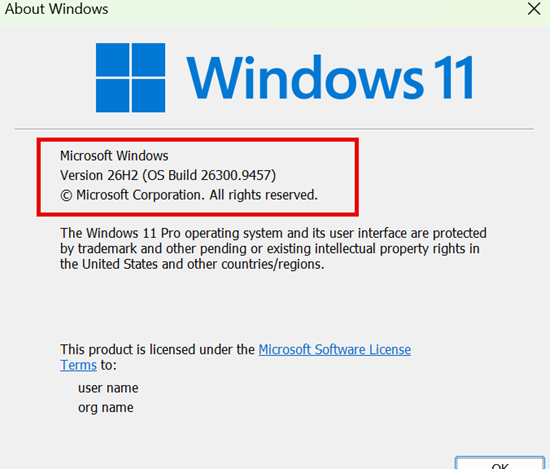
Microsoft’s release health page says the update downloads and installs automatically when it is ready for your device, and one restart finishes it. After the restart, press Win+R, type winver and press Enter. You should see Windows 11, version 26H2. The same information is under Settings > System > About.
If you want to confirm which updates are on the PC, here is how to view installed updates.
2) The enablement package by hand
For one PC that Windows Update has not offered, download KB5121794 for x64 or ARM64 from the Microsoft Update Catalog and run it. The PC must already be on 24H2 or 25H2 with KB5124010 or later. Microsoft will not offer it to a device with a safeguard hold, so a manual install on a held PC is a bet against a known compatibility problem. I would not do it on a work machine.
3) Installation Assistant, ISO or Media Creation Tool
Microsoft’s Windows 11 download page now lists 26H2 as the current release. It offers three tools.
- Installation Assistant: upgrades the PC you are sitting at. It needs 9 GB of free space, works for x64 only, and also covers a Windows 10 PC that is eligible for Windows 11.
- Media Creation Tool: makes a bootable USB or DVD for a clean install, x64 only.
- ISO: a multi-edition disk image for installation media or a virtual machine. ARM64 has its own download.
A clean install from the ISO gives you 26H2 straight away. An in-place upgrade from the ISO is much bigger than the enablement package, so use these when you need a reinstall, a new VM or a Windows 10 to 11 move, not when 25H2 is already running.
Skip tools that strip the hardware checks. Microsoft’s page warns that installing on an unsupported PC may cause compatibility problems and affect the warranty.
Why 26H2 Is Not Showing in Windows Update
The rollout is phased and Microsoft says it will expand over a few months, so the list is short:
- The toggle is off. The offer goes to devices that turned on “Get the latest updates as soon as they’re available”.
- The PC is not on 24H2 or 25H2. 23H2 and older do not get this package.
- It is a 26H1 device. There is no path to 26H2 from that branch.
- A safeguard hold is blocking it. Microsoft holds the update for known compatibility issues. The hold comes off when the issue is fixed, not when you force it.
- Policy or deferral is blocking it. On managed PCs, feature update deferral, a pause or WSUS approval is usually the answer. Windows Update shows nothing wrong because it was told not to offer it.
Known Issues to Check Before You Install
Microsoft’s release health page for 26H2 lists four. The status changes often, so open it before you install.
- USB audio devices: some USB Audio Class 1.0 devices show Code 10 or give no sound.
- Domain trust: Credential Guard protected PCs with Machine Identity Isolation lose the secure channel (workaround above).
- Black screen after sign-in: mostly AVD hosts with FSLogix (workaround above).
- AC-3 audio decoding: some legacy apps close unexpectedly.
Microsoft lists the first three as mitigated. The AC-3 issue is only confirmed, with no fix yet. All four also affect 24H2 and 25H2, so staying on those versions does not protect you.
Windows 11 26H2 FAQ
Is Windows 11 26H2 a full upgrade?
No. It is an enablement package on top of 24H2 or 25H2. It installs like a monthly update with one restart.
Do I need new hardware for Windows 11 26H2?
Not if the PC already runs 24H2 or 25H2. An enablement package cannot change what the PC supports, so the same hardware qualifies.
Can I skip 26H2?
Yes, until your current version ends. 24H2 Home and Pro updates stop on 13 October 2026, 25H2 on 12 October 2027. After that date the PC gets no security fixes.
Why is the build number 26300 and not 26200?
Microsoft’s release information lists 26H2 as build 26300. If a script or a vendor support list checks for 26200, update it before you deploy.
