Close Menu
    What's Hot

    Games Like Overwatch: 8 Shooters Worth Playing Now

    November 22, 2026

    Ubiquiti Device Discovery Tool for Finding UniFi Gear on a Windows Desktop

    November 22, 2026

    Microsoft Purview Compliance Portal Tutorial for Admins

    November 17, 2026
    Facebook X (Twitter) YouTube LinkedIn
    Facebook X (Twitter) YouTube LinkedIn
    SysprobsSysprobs
    • Tech Guides
      • Windows
        • Windows 11
        • Windows 10
        • Windows Servers
      • Virtualization
        • VirtualBox
        • VMware
        • Hyper-V
        • Server Virtualization
        • VirtualBox Images
      • PC
        • Linux
        • macOS
        • Hackintosh
        • MS Office
      • Pro IT Tips
        • Internet
        • MS Exchange
        • Fintech
    • Reviews
      • Gadgets
        • Android
        • iPhone
    • Security & Privacy
      • IT Security
    • Data
      • Calculators and tools
      • Statistics
      • Reference tables
    SysprobsSysprobs
    Home»Featured»Ubiquiti Device Discovery Tool for Finding UniFi Gear on a Windows Desktop

    Ubiquiti Device Discovery Tool for Finding UniFi Gear on a Windows Desktop

    Amy BrosBy Amy Bros
    Share
    Facebook Twitter LinkedIn Pinterest Email

    Anyone who has racked a handful of access points knows the awkward gap between plugging hardware in and reaching it. The device powers on, pulls an address from DHCP, and then sits there anonymously among thirty other leases. Network discovery utilities exist to close that gap, and most admins keep two or three of them around: a broad port scanner for the whole subnet, an ARP-table reader for quick MAC lookups, and something vendor-specific when the gear comes from a single manufacturer.
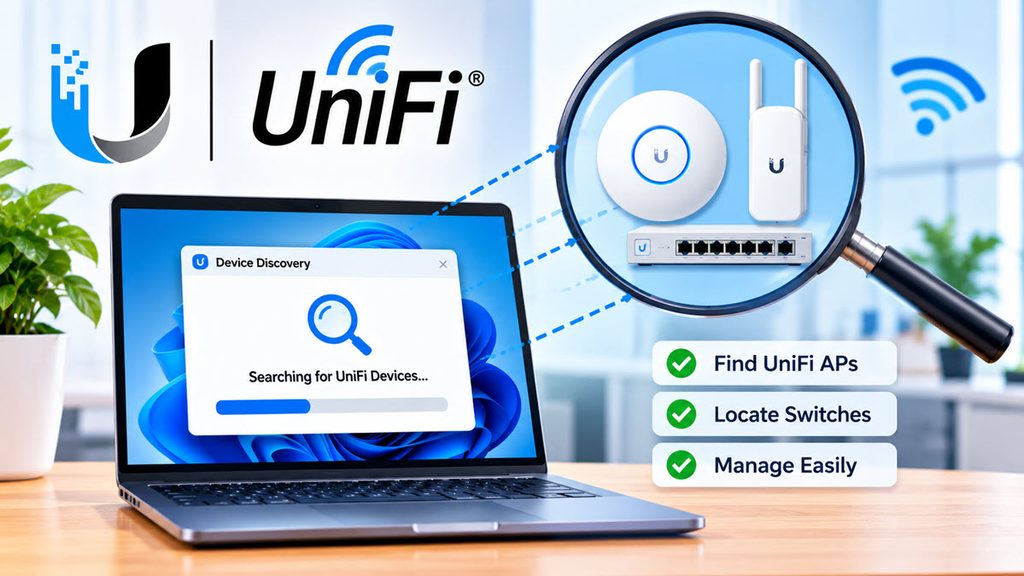
    Device Discovery Tool

    That last category is the interesting one. Generic scanners tell you an IP responds. They rarely tell you which firmware that responder is running, or whether it is an airMAX radio or an EdgeRouter.

    Vendor-aware scanning

    Vendor tools work differently because they speak the manufacturer’s own discovery protocol rather than guessing from open ports. Ubiquiti hardware broadcasts identifying information on the local segment, and a listener tuned to that broadcast gets structured answers back: model, address, firmware. No credentials, no SSH, no guessing at default hostnames.

    The tradeoff is scope. A vendor tool finds that vendor’s equipment and nothing else, which is fine when you are commissioning a site built entirely on one ecosystem and useless when you are auditing a mixed closet.

    Ubiquiti Device Discovery Tool in practice

    The Ubiquiti Device Discovery Tool, published under the name Ubiquiti Networks, Inc., is the Android version of a utility most admins first met on the desktop. It scans the local network and lists every Ubiquiti device it can hear, with filtering by product family so you can narrow the view to UniFi, airMAX, or EdgeMAX rather than scrolling one long list.

    For each discovered device you get the basics that matter during setup and triage: IP address, MAC address, and firmware version. That combination answers the three questions that come up most often on site. Where is it, which physical unit is it, and is it running the build I expect.
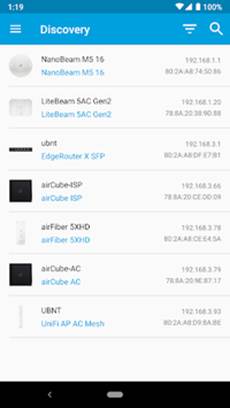
    Image

    One limitation matters before you waste time chasing a phantom problem: devices already adopted and managed by a UniFi Controller will not appear in the discovery list. If a camera or AP you know is online refuses to show up, adoption is usually the explanation rather than a cabling fault.

    Search works alongside the filters, which helps on larger deployments where a filtered list is still forty entries long. Type part of a MAC and the list collapses to the unit in your hand.
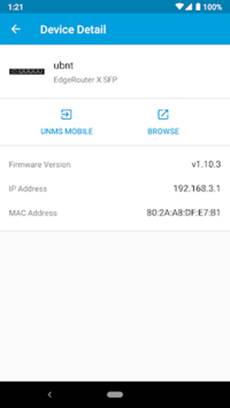
    Image

    Why the desktop appeals

    Phone-based discovery is excellent when you are standing on a ladder. It gets less pleasant once the job moves to a bench, because the follow-up work-opening a device’s web UI, pasting MAC addresses into documentation, cross-checking firmware against a release page- all happens on a keyboard. The practical fix is to download UBNT Discovery Tool for Windows 10 and run the same discovery list right next to the browser tabs doing that follow-up work.

    Running the Android build on Windows means using an Android emulator, and the one configuration detail that matters here is networking. Discovery depends on broadcast traffic reaching the app, so the emulator has to sit on the same Layer 2 segment as the devices. A NAT’d virtual adapter will hide the broadcasts and you will see an empty list on a network full of hardware.

    Commissioning jobs versus home-lab resets

    This is a commissioning and triage tool, not a monitoring platform. It shines during the hour after installation, when nothing is adopted yet and you need to confirm that twelve access points came up with the firmware you flashed them with.

    Home-lab users get similar value from a different angle, usually after a factory reset has quietly moved a device to a new address. Rather than scanning the whole /24 and parsing the results, you look at a list that only contains Ubiquiti gear.

    And when one of those twelve APs does not appear, check the controller before you check the cable. Adopted devices stay invisible, exactly as the app’s own notes warn.

    Free Tips network
    Share. Facebook Twitter Pinterest LinkedIn Tumblr Email
    Amy Bros
    • Website

    Amy Bros | Senior Technical Writer Maya is a former systems architect turned digital storyteller. With 12 years of experience in the trenches of IT, she specializes in breaking down complex cloud infrastructure and troubleshooting the "un-fixable." When she isn't writing, she’s likely optimizing her home automation or hunting for the perfect espresso.

    Related Posts

    Games Like Overwatch: 8 Shooters Worth Playing Now

    November 22, 2026

    Microsoft Purview Compliance Portal Tutorial for Admins

    November 17, 2026

    The Cost Of Open Source Icon Debt Before Series A

    November 17, 2026

    Fedora vs Arch Linux: Which Distro Should You Pick?

    November 13, 2026

    Free Virtual Machine Software for Windows, Mac and Linux (What to Use Now)

    November 11, 2026

    Microsoft Publisher Alternatives for Mac and Windows (Publisher Is Retiring)

    November 11, 2026
    Leave A Reply Cancel Reply

    Top Posts

    Where is the Outlook QR code? How to Use?

    February 16, 2024

    How to Install and Use Outlook for Ubuntu 24.04 LTS/24.10

    December 10, 2025

    Download and Use Windows 7 Pre-Installed VirtualBox Image

    May 3, 2022
    Don't Miss

    Games Like Overwatch: 8 Shooters Worth Playing Now

    November 22, 2026

    If you want games like Overwatch, start with Marvel Rivals. In my view it is…

    Ubiquiti Device Discovery Tool for Finding UniFi Gear on a Windows Desktop

    November 22, 2026

    Microsoft Purview Compliance Portal Tutorial for Admins

    November 17, 2026

    The Cost Of Open Source Icon Debt Before Series A

    November 17, 2026
    Stay In Touch
    • Facebook
    • YouTube
    • Twitter
    • LinkedIn
    Latest Posts

    Games Like Overwatch: 8 Shooters Worth Playing Now

    November 22, 2026

    Ubiquiti Device Discovery Tool for Finding UniFi Gear on a Windows Desktop

    November 22, 2026

    Microsoft Purview Compliance Portal Tutorial for Admins

    November 17, 2026
    300x250 001 English PCRepairKit Yakusheva
    UP NEXT FOR YOU
    • Overwatch 2 AlternativesGames Like Overwatch: 8 Shooters Worth Playing Now
    • Ms Purview Landing PageMicrosoft Purview Compliance Portal Tutorial for Admins
    • Cost Of Open Source Icon Debt BeforeThe Cost Of Open Source Icon Debt Before Series A

    INFORMATION
    • About
    • Contact Us
    • Privacy Policy
    ABOUT

    Established in 2007, Sysprobs is a trusted resource for IT professionals and system administrators. We publish practical, battle-tested guides for the people who run Microsoft infrastructure — Windows, Windows Server, Active Directory, Entra ID, Intune, Exchange, and virtualization. Real fixes for real production problems, written by people who've actually hit them.

    POPULAR SECTION

    WINDOWS 11
    WINDOWS 10
    VIRTUALIZATION
    IT SECURITY
    PRO IT TIPS


    Information
    • About
    • Contact Us
    • Homepage
    • Privacy Policy
    Sysprobs
    Facebook X (Twitter) YouTube LinkedIn
    • Home
    • Windows
    • Cloud
    • Security & Privacy
    © 2026 SYSPROBS: System Security & Fintech Solutions. Protected by Cloudflare.

    Type above and press Enter to search. Press Esc to cancel.