


The Microsoft Windows Production PCA 2011 certificate, the one that signs the Windows boot loader, expires on 19 October 2026. The other two 2011 certificates already expired in June. A Secure Boot certificate 2023 check on Windows 11 or Windows 10 takes about five minutes, and the PC keeps booting whatever the answer is.
As I have been reading and hearing about this Secure Boot certificate expiration, I thought to check my home and office PC to confirm where my PCs stand.
In this guide, I’ll show how to read the answer from the Windows Security app, PowerShell, the registry and Event Viewer, in that order. The first check is for home users. The rest is for admins with more than a few PCs.
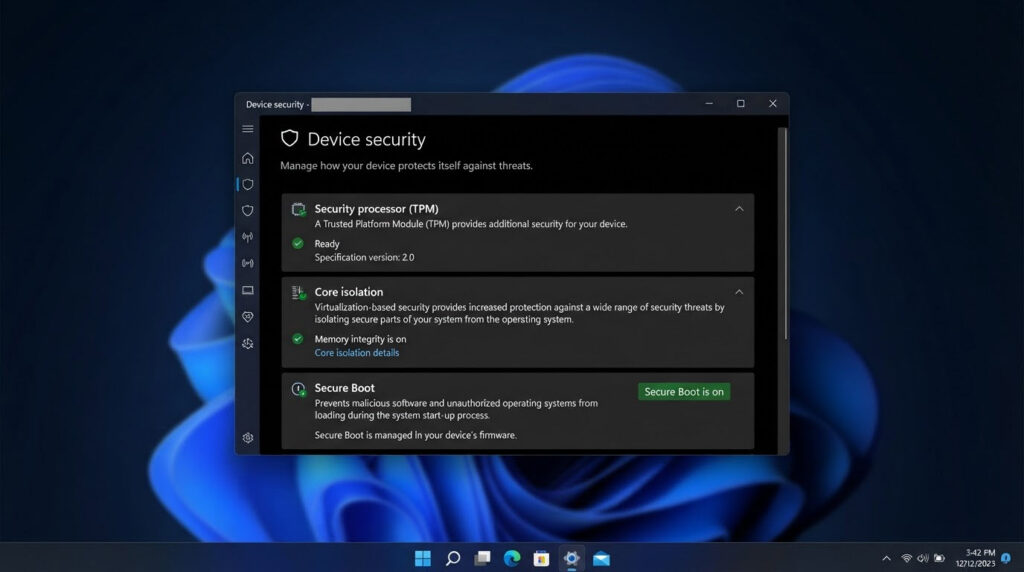
Open Windows Security > Device security > Secure Boot. A green check means Secure Boot is on and all required certificate updates are applied. For a direct check, run PowerShell as administrator and enter
[System.Text.Encoding]::ASCII.GetString((Get-SecureBootUEFI db).bytes) -match 'Windows UEFI CA 2023'. True means the new Windows boot loader certificate is in the Secure Boot database.
Which Certificates Are Changing and When
Secure Boot keeps two lists in the firmware. The KEK (Key Exchange Key) list decides who may update the other lists. The DB (allowed signatures database) holds the certificates that boot loaders must be signed with. Microsoft is replacing the 2011 certificates in both lists.
| Old certificate | Store | Expires | Replaced by |
|---|---|---|---|
| Microsoft Corporation KEK CA 2011 | KEK | 24 June 2026 | Microsoft Corporation KEK 2K CA 2023 |
| Microsoft UEFI CA 2011 | DB | 27 June 2026 | Microsoft UEFI CA 2023 (third-party boot loaders and EFI apps) |
| Microsoft UEFI CA 2011 | DB | 27 June 2026 | Microsoft Option ROM UEFI CA 2023 (third-party option ROMs) |
| Microsoft Windows Production PCA 2011 | DB | 19 October 2026 | Windows UEFI CA 2023 (signs the Windows boot loader) |
The Microsoft UEFI CA 2011 is replaced by two certificates, not one, which most guides skip. The dates come from Microsoft’s page on Secure Boot certificate expiration and CA updates.
What Happens If Your PC Does Not Have Them
Nothing breaks on the day. A PC without the 2023 certificates keeps starting, and normal Windows updates keep installing. What stops is new protection for the early boot process: updates to the Windows Boot Manager, the Secure Boot databases and the revocation lists, and fixes for newly found boot-level problems such as BitLocker bypass issues. Some third-party components that rely on Microsoft’s newer Secure Boot trust may also fail to update.
So the risk is slow. The PC falls behind on boot-level security over time. Microsoft’s expiry explainer also says Secure Boot should not be disabled to work around this. Please don’t. My post on how to disable Secure Boot on a Surface Pro to boot from USB is for a different job.
Quick Secure Boot Certificate 2023 Check in the Windows Security App
To know if your PC has the new Secure Boot certificates, a home user only needs the badge. No commands needed.
- Open Windows Security from the Start menu.
- Go to Device security, then Secure Boot.
- Read the badge and the status text under it.
Here is what each state means, from Microsoft’s page on the Secure Boot certificate status in the Windows Security app.
- Green check: Secure Boot is on and all required certificate updates have been applied. Nothing more to do.
- Yellow: a recommendation. Usually a hardware or firmware limit is blocking the automatic update. Check the PC maker’s support page for a BIOS/UEFI update, or contact them. For some yellow messages Microsoft says the PC needs more validation and points to aka.ms/getsecureboot.
- Red: a boot-level security update exists, but the current boot configuration cannot receive it. Microsoft sends you to aka.ms/getsecureboot.
Red warnings have an ‘I accept the risks, don’t remind me’ option. Microsoft warns against using it if the PC has not received the new certificates.
If the page shows no badge, the PC may be managed by an organisation. On managed Windows 10/11 devices the badge changes and notifications are off by default (the status text still shows). Admins turn them on by setting HideSecureBootStates to 0 under HKEY_LOCAL_MACHINE\SOFTWARE\Policies\Microsoft\Windows Defender Security Center\Device security. It is a REG_DWORD, and 1 hides the status.
Check with PowerShell
The badge is the quick answer. PowerShell shows what is actually in the firmware. Open PowerShell as administrator and confirm Secure Boot is on first.
Confirm-SecureBootUEFIIt returns True when Secure Boot is on. If it returns False or an error, Secure Boot is off or the PC is not booting in UEFI mode, and Microsoft says the certificate update steps do not apply. If you are not sure how your PC boots, my post on the UEFI boot order shows where those settings live.
Now the check Microsoft documents in KB5025885 for the new Windows boot loader certificate.
[System.Text.Encoding]::ASCII.GetString((Get-SecureBootUEFI db).bytes) -match 'Windows UEFI CA 2023'True means the certificate is in the DB. False means this PC has not received it yet, or the firmware blocked it.
One limit. This command reads the DB and searches for the certificate name as text. It does not tell you whether Windows is already booting from the new 2023-signed boot manager. For that, use the registry status and event 1808 below.

Read the Status in the Registry
The registry gives the status in words. Run these two in an elevated command prompt or PowerShell.
reg query HKLM\SYSTEM\CurrentControlSet\Control\SecureBoot\Servicing
reg query HKLM\SYSTEM\CurrentControlSet\Control\SecureBoot /v AvailableUpdates
What Does UEFICA2023Status Updated Mean?
Updated means the deployment has finished on this PC. UEFICA2023Status is a string with three possible answers: NotStarted (not begun), InProgress (started, not finished, a restart may be needed) and Updated. Two more values in the Servicing key help when it fails:
- UEFICA2023Error: 0 on success. Anything else is the first error code, which can come from the firmware.
- UEFICA2023ErrorEvent: the event ID Windows logged for that error, so you know which event to open.
AvailableUpdates, in the parent SecureBoot key, is the trigger that tells Windows what to apply. 0 means nothing is queued, and the bits clear as each step succeeds. You will use it again in the manual method below.
Many blog posts show WindowsUEFICA2023Capable as the status. Microsoft marks it as for reference only (2 means the 2023 CA is in the DB and the PC booted from the 2023-signed boot manager) and says to use UEFICA2023Status instead. The details are on Microsoft’s registry key page for Secure Boot.
Confirm It in Event Viewer
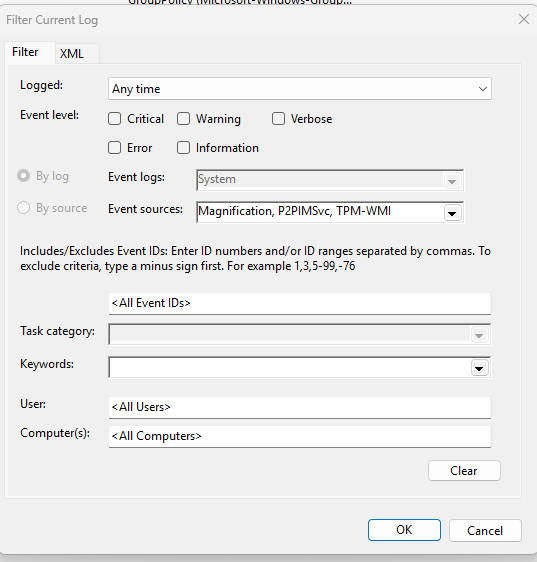
The event log tells you when it happened and why it failed. Open Event Viewer, go to Windows Logs > System, choose Filter Current Log and pick TPM-WMI under ‘Event sources’.
Secure Boot event ID 1808 is the one you want. It means the PC has the required 2023 certificates and a boot manager signed with the new certificate, and no further action is needed. Event 1801 is the opposite: the updated certificates are available but not applied to the firmware yet. The rest are in Microsoft’s list of Secure Boot DB and DBX variable update events:
| Event ID | Meaning |
|---|---|
| 1799 | The new boot manager was installed |
| 1045, 1044, 1043 | Microsoft UEFI CA 2023, the Option ROM CA 2023 and the 2023 KEK were added |
| 1795 | Firmware returned an error. Windows retries on restart. Look for a firmware update from the PC maker |
| 1796 | Unexpected error. Retried at the next restart |
| 1803 | No PK-signed KEK found for this PC, so the KEK update cannot go ahead. Ask the PC maker |
| 1032 | BitLocker would go into recovery if the update were applied. Microsoft says to suspend BitLocker for 2 restarts |
If nothing moves, check the scheduled task that does the work. In an elevated prompt:
schtasks.exe /Query /TN "\Microsoft\Windows\PI\Secure-Boot-Update" /FO LIST /VStatus Ready means the task exists and is enabled. Disabled means switch it on, and Error or Not Found means it has to be recreated. Microsoft’s Secure Boot troubleshooting guide lists the other usual causes: Secure Boot off in the firmware, and firmware that overwrites the DB instead of adding to it.
If It Says Not Updated
Read the status and the events together. Status NotStarted with event 1801 means the update is waiting and nothing has blocked it. InProgress means restart and check again. A non-zero UEFICA2023Error with events 1795, 1796 or 1803 means it is blocked, so look at the firmware first.
Let Windows Update Do It
For most PCs this is the whole answer. Microsoft groups devices into buckets by maker, motherboard and firmware version. When a bucket has enough successful updates and no failures, it becomes high confidence and the certificates ride along in the monthly cumulative update. Install the latest Windows updates, restart, and check again in a few days.
Before that, look for a BIOS/UEFI update from the PC maker. A yellow badge, or event 1795 or 1803, means the firmware is the blocker, not Windows. Older PCs out of support may never get one.
Trigger It Manually (Admins, One PC at a Time)
You do not need this on a normal home PC. Use it on a PC you manage, one at a time, and back up the BitLocker recovery key first, because a Secure Boot change can make BitLocker ask for it on the next start. Here is how to recover the BitLocker key if you need it.
These are Microsoft’s commands from the registry key page above, in an elevated PowerShell.
reg add HKEY_LOCAL_MACHINE\SYSTEM\CurrentControlSet\Control\Secureboot /v AvailableUpdates /t REG_DWORD /d 0x5944 /f
Start-ScheduledTask -TaskName "\Microsoft\Windows\PI\Secure-Boot-Update"- AvailableUpdates should quickly change to 0x4100.
- Restart the PC yourself.
- Run the same
Start-ScheduledTaskline again. This updates the boot manager. - AvailableUpdates should now read 0x4000. Then check UEFICA2023Status and event 1808.
The task also runs by itself every 12 hours, so it may already be running when you look. Do not reset Secure Boot to the firmware defaults to speed things up. Microsoft says that can remove trust for the 2023 boot manager and stop the PC booting.
[DINESH: if you ran the manual trigger, what happened at each step and whether BitLocker asked for the key]VMs and Dual Boot Notes
Hyper-V. The March 2026 Windows updates must be installed on both the host and the guest. In a guest, event 1795 (write-protected media) means the host needs the update, and event 1803 means the guest needs it.
VMware vSphere. VMs created on older ESXi versions can fail with event 1801 or 1769 because of a missing 2023 KEK or an empty Platform Key. Broadcom’s KB 423893 lists the fixes: ESXi 8.0 U3j (P09) or ESX 9.1.1.0 for VMs without a vTPM, and ESX 9.1.1.0 for VMs with a vTPM (supported Windows guests, VMware Tools 13.1.5 and the July 2026 Windows update or later). It does not cover Workstation or Fusion.
Linux dual boot. A shim that is already installed keeps booting. Red Hat says the PC boots as long as either of Microsoft’s certificates is in the firmware DB, and its new shims are signed with both the 2011 and 2023 keys. To see what your firmware has, run these from Linux, as AlmaLinux suggests.
mokutil --sb-state
mokutil --db | grep 'UEFI CA 2023'
If the second command prints nothing, update the firmware (fwupd on Linux or the PC maker’s tool) and check again.
Bootable media is a separate job. Revoking the PCA 2011 certificate (KB5025885, event 1037) cannot be undone and needs updated recovery media, so I’m keeping it out of this post.
FAQ
Will my PC stop booting when the Secure Boot certificate expires?
No. Microsoft says PCs without the 2023 certificates keep starting and keep installing normal Windows updates. What stops is new boot-level security fixes. The expiry date itself does not block a boot.
Why does the PowerShell check return False?
The update has not reached this PC yet, Secure Boot is off, or the firmware blocked it. Read UEFICA2023Status and look for events 1801, 1795 and 1803.
Do I need a BIOS update for the Secure Boot certificates?
Sometimes. Microsoft says some PCs need a firmware update from the PC maker first. Event 1803 means the maker has not supplied a signed KEK for your model, and there is no supported manual fix for that, so contact them.
Does this affect Linux dual boot?
Not for a shim that is already installed. A newer shim signed only with the 2023 certificate needs the 2023 CA in the DB, so run the mokutil check above.
