


You’ve spent years configuring servers, troubleshooting networks, managing cloud migrations, and automating workflows. You know your way around a command line, a hypervisor, and a ticketing system. So when you finally decide to go freelance and start taking on your own IT consulting or contract work, the technical side is the easy part.
The part that catches most IT professionals off guard? The financial administration.
It’s not that the financial side of freelancing is difficult. It’s that nobody teaches it. You go from having an employer who handles your paycheck, tax withholdings, benefits, and year-end forms to being entirely responsible for all of it yourself. And just like a production server without monitoring, if you ignore your financial admin, problems build silently until they become emergencies.

This guide covers the financial tools and practices that every freelance IT professional should set up from day one—the admin stack behind the tech stack.
Separate Your Business and Personal Finances Immediately
This is the equivalent of isolating your dev and production environments. You wouldn’t deploy directly to prod, and you shouldn’t run business income through your personal checking account.
Open a dedicated business bank account and route all client payments through it. This does three things:
- Creates a clean transaction history that simplifies tax preparation
- Establishes your operation as a legitimate business (important for contracts, insurance, and loans)
- Makes it dramatically easier to calculate your actual business income and expenses
Most online banks offer free business checking accounts with no minimum balance. Set this up before you invoice your first client.
Set Up Accounting Software Early
You wouldn’t monitor a server infrastructure with spreadsheets and sticky notes. Don’t manage your business finances that way either.
Cloud-based accounting platforms like Wave (free), QuickBooks Self-Employed, or FreshBooks connect to your business bank account, automatically categorise transactions, and generate the financial reports you’ll need at tax time.
The key features to look for:
- Automatic bank feed syncing
- Invoice generation and payment tracking
- Expense categorisation with receipt capture
- Quarterly tax estimate calculations
- Year-end reporting (profit and loss, balance sheet)
Set it up once, keep it updated, and your year-end tax filing will take hours instead of days.
Create Your Own Pay Documentation
Here’s one that surprises a lot of IT freelancers. When you were employed, your company generated a pay stub for every pay period. It showed your gross earnings, tax withholdings, benefit deductions, and net pay. You probably never thought twice about it.
Now that you’re on your own, nobody is generating that documentation for you. And you’re going to need it sooner than you think.
Landlords require proof of income for lease applications. Banks and mortgage lenders need it for loan approvals. Even some professional liability insurance providers ask for income documentation during the application process. If all you can show is a bank statement with scattered deposits, you’ll have a harder time than someone who can produce clean, itemised pay records.
The solution is straightforward: use a paystub generator to create your own pay stubs each time you pay yourself from your business account. You enter your earnings for the period, any tax withholdings or estimated payments, and the tool produces a professional document that looks exactly like what an employer would provide. It takes a few minutes per pay period and saves you from scrambling later.
If you’re unfamiliar with the format, it’s worth learning how to read a pay stub so you understand what each line item represents—gross pay, FICA, federal and state withholdings, and net pay. This knowledge helps you generate accurate self-employment pay records and catch discrepancies in any W-2s or 1099s you receive from clients.
Understand Your Tax Obligations
As a W-2 employee, taxes were withheld automatically from every paycheck. As a freelancer, you’re responsible for:
- Self-employment tax: 15.3% of your net earnings (covering both the employer and employee portions of Social Security and Medicare).
- Federal income tax: Based on your total taxable income for the year.
- State income tax: Varies by state. Some states have no income tax; others charge 10%+.
- Quarterly estimated payments: The IRS expects you to pay estimated taxes four times per year (April 15, June 15, September 15, January 15). Missing these deadlines results in penalties and interest.
A common mistake for first-year freelancers is not setting aside enough for taxes. A safe rule of thumb: reserve 25–30% of every payment you receive in a separate savings account earmarked for taxes. This prevents the shock of a large tax bill in April.
Track Your Deductions Like You Track Your Uptime
One of the biggest financial advantages of freelancing is the range of business expenses you can deduct. For IT professionals, these add up quickly:
Hardware: laptops, monitors, networking equipment, lab gear
Software: IDE licences, cloud hosting credits, monitoring tools, VPN subscriptions
Home Office: a proportional deduction of rent/mortgage, utilities, and internet based on your dedicated workspace
Professional Development: certifications (Azure, AWS, Google Cloud), online courses, conference fees
Travel: mileage or transportation to client sites
Professional Services: accounting fees, legal consultations, professional liability insurance
The key is documenting these expenses as they occur. Photograph receipts with a mobile expense app, categorise them in your accounting software, and keep a running total. At year-end, your deductions will be organised and defensible if the IRS ever asks.
Get Your Contracts Right
Every engagement should have a written contract or statement of work (SOW). This isn’t just legal protection, it’s financial protection. Your contract should specify:
- Scope of work and deliverables
- Payment terms (net 15, net 30, milestone-based)
- Hourly rate or project fee
- Late payment penalties
- Intellectual property ownership
- Termination clauses
Templates from platforms like Bonsai or AND.CO are specifically designed for freelancers and cover all of these bases. Customise one to your practice and reuse it for every client.
Build a Financial Dashboard
You wouldn’t run an infrastructure without a monitoring dashboard. Apply the same principle to your finances.
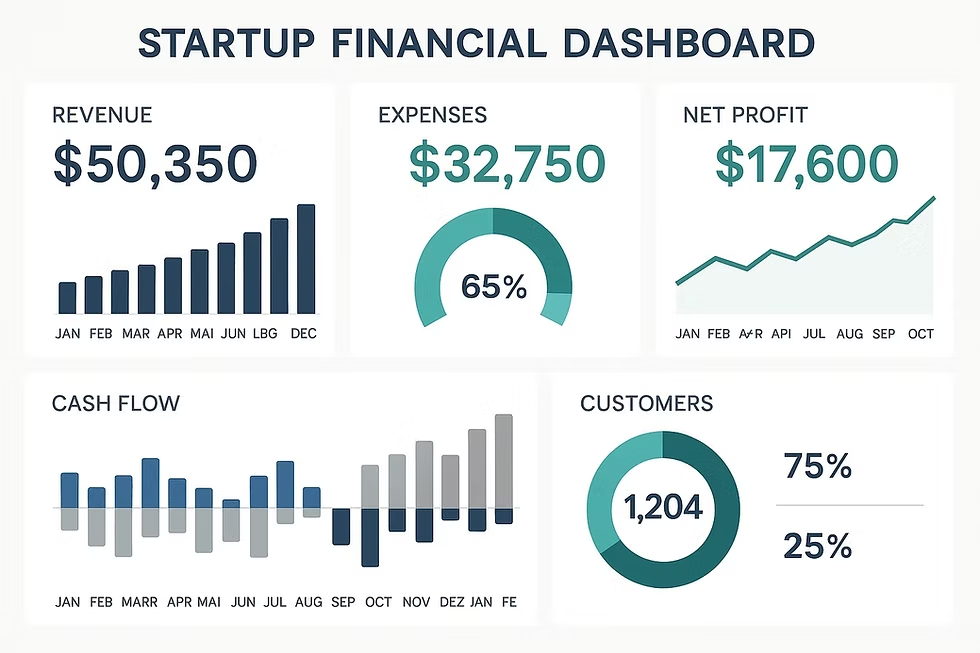
At minimum, you should be tracking these metrics monthly:
- Monthly revenue (invoiced and collected)
- Outstanding invoices and days past due
- Monthly business expenses
- Tax reserve balance (that 25–30% you’re setting aside)
- Effective hourly rate (total income divided by total hours worked)
Your accounting software can generate most of these reports automatically. Review them monthly and you’ll always know where you stand—no surprises, no scrambling.
The Bottom Line
Going freelance as an IT professional is one of the most rewarding career moves you can make. You get to choose your projects, set your rates, and work on the technologies you care about. But freedom comes with responsibility and financial administration is the responsibility that catches the most people off guard.
Think of your financial admin as another system to deploy: set it up properly from the start, automate what you can, monitor it regularly, and it will run smoothly in the background while you focus on the work that actually matters.
Your tech stack got you here. Your admin stack keeps you here.
