


A small online store opens on a Monday morning to a white screen and a ransom note. The product pages are gone. The customer database answers with errors. Every file on the server has been encrypted, and the only message left behind asks for payment in cryptocurrency. What happens in the next few hours depends almost entirely on one question that should have been settled months earlier. Where are the backups, and can they be trusted?
The First Hours After an Attack
After a breach, the priority is a clean version of the site that predates the intrusion. A working backup turns a catastrophe into an inconvenience. The site gets wiped, restored from a known-good copy, patched against the hole the attacker used, and brought back online. Without that copy, the choices narrow to paying criminals or rebuilding from nothing.

Speed matters because downtime has a price. Organizations face an average of 24 days of downtime after a ransomware attack. In 2025, 53% of businesses recovered within a week, while larger operations averaged 38 days because their systems are more tangled. For a store that sells around the clock, even a few days dark means lost orders and customers who do not come back. The financial side is steep on its own, with recovery costs averaging $1.53 million in 2025 before any ransom is counted.
Backup Scope and Coverage
A website is more than its homepage. A full backup captures the files, the databases, the configuration, and the email tied to the domain. A partial backup that saves files but skips the database leaves a restored site with no products and no user accounts, which is no real recovery at all.
Frequency decides how much work disappears in an attack. A host that backs up once a day caps the worst case at 24 hours of lost transactions. A host that backs up weekly raises that ceiling to seven days. The span between the last good backup and the moment of the attack is the recovery point, and shrinking it is the difference between losing an afternoon and losing a week of business. Owners rarely ask about backup frequency when they sign up, then find out the hard way once something breaks.
The 3-2-1 Rule
Security professionals have leaned on the 3-2-1 rule for almost two decades. Keep three copies of the data, on two different kinds of media, with one copy stored offsite. A single backup on the same server dies with that server. A second copy on separate hardware survives a disk failure. The offsite copy survives a fire, a theft, or an attack that reaches the whole building.
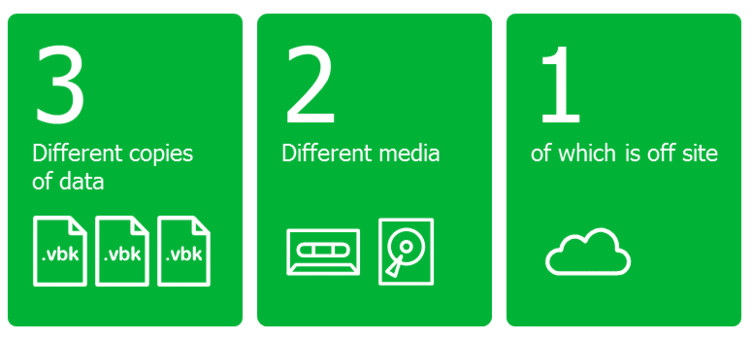
The rule has grown stricter as ransomware has grown smarter. A newer form, written as 3-2-1-1-0, adds one immutable or air-gapped copy and zero recovery errors confirmed through testing. Those additions exist for one reason. Attackers learned to go after the backups themselves, so the strategy had to account for a copy that survives even a deliberate hunt.
Backups At The Hosting Layer
Much of this can be handled by the host rather than the site owner. A plan built on reliable website hosting usually includes automatic daily backups, offsite storage, and a one-click restore that does not require a database administrator. For an owner without technical staff, that automation is the part that actually gets done, because a backup that depends on someone remembering to run it tends not to happen.
The detail worth checking is retention and location. A host that keeps 30 days of backups in a separate facility gives far more room to recover than one that holds a single copy on the same machine as the live site. Thirty restore points also help when an intrusion went unnoticed for weeks, because the most recent backup may already carry the attacker’s code.
The Backup Attack Surface
Modern ransomware goes after the backups before the live site. An owner with a clean copy has no reason to pay, so the recovery files are the first target. The numbers show how deliberate this has become. In recent incidents, attackers attempted to compromise backups in 94% of cases, and 57% of those attempts succeeded. The median time from first intrusion to the ransomware firing is now about 5 days, which leaves a narrow window to catch anything at all.
This is why where a backup lives matters as much as the fact that it exists. A backup stored on the same server, reachable with the same credentials, falls in the same attack. A copy held offsite and disconnected from the live environment stays out of reach. Organizations with intact backups recover within a week 46% of the time. Those whose backups were compromised manage it only 26% of the time.
Immutable and Offline Copies
An immutable backup cannot be altered or deleted once written, not even by an administrator account, until a set period passes. That property defeats the central tactic of ransomware, which is to encrypt or erase the recovery files before demanding payment. An air-gapped copy goes further by keeping the backup physically disconnected from any network.
These copies also change the financial math. Businesses that kept offline backups cut their recovery costs by 44% against those who paid the ransom. Measured against an average ransomware incident that reaches into the millions once downtime and remediation are added, the price of a second isolated copy is minor.
Restore Testing
A backup that has never been restored is a guess. A restore test means recovering the data to a separate location and confirming the site comes back whole. Checking that a backup job reported success proves nothing on its own, since a job can finish cleanly and still produce a file that will not load. Many owners learn this only at the worst moment, when the live site is already gone.
Established guidance on backup testing advises running a real restore at least once a quarter. The test takes about an hour and removes the largest unknown in the entire plan.
The First Step Worth Taking
Most site owners can close the biggest gap this week by confirming two things. First, that backups run automatically every day and land somewhere the live server cannot reach. Second, that a restore has been tested against a spare location within the last three months. A site with a daily offsite backup and a proven restore can treat a cyber attack as a bad afternoon. A site without either is one bad Monday away from starting over.
