


Facility teams often manage separate systems for maintenance, energy use, room scheduling and physical access. When these tools cannot share information, staff spend extra time switching dashboards, entering the same details twice and tracking down incomplete records.
A unified technology setup brings those workflows into one operating view. It gives managers clearer oversight while helping technicians respond faster to everyday issues. The result is a facility that runs more predictably, with fewer manual handoffs and better coordination across departments.

Challenges in Modern Facilities
Modern buildings generate data through sensors, work-order software, visitor systems and heating or cooling equipment. Older tools often store that information in separate databases, which makes it difficult to see how one event affects another. A failed ventilation unit, for example, may trigger a temperature alert without creating a maintenance ticket or notifying the employee responsible for that floor.
Limited compatibility also creates reporting problems. Teams may spend hours combining spreadsheets before a monthly review. As discussed in this overview of facilities management technology, connected systems can support better visibility and more proactive operations. Start by documenting every platform in use, who owns it and what information it holds.
The Power of Integrated Platforms
An integrated platform connects related building functions through one interface. Staff can view alerts, maintenance activity and occupancy information without opening several applications. Common data also reduces errors caused by copying names, room numbers or schedules between systems.
Physical access is a strong candidate for early integration because it affects visitors, employees and contractors across multiple sites. An enterprise access control system can connect with HR records, customizable dashboards, map-based monitoring and automated incident workflows. For example, when HR updates an employee’s status, the system can adjust permissions through a defined process. Before selecting a platform, confirm it supports your existing systems, open integrations, and location-specific operating rules.
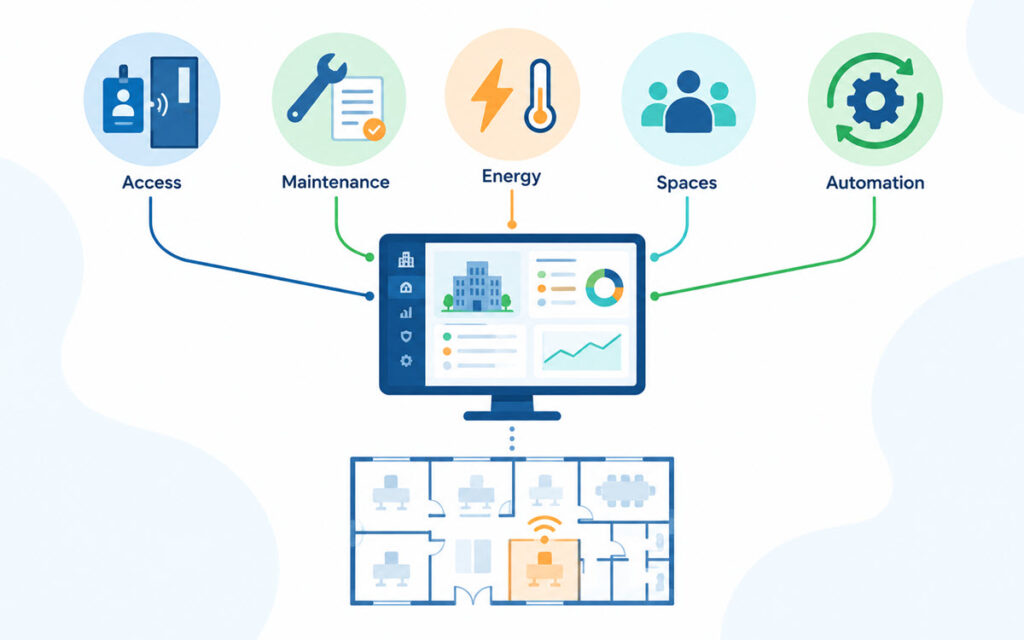
Enhance Efficiency with Automation
Automation works best on repetitive tasks with clear triggers and outcomes. A room sensor can report that a space has remained empty for a set period, prompting the building system to adjust lighting or temperature. A maintenance platform can create a ticket when equipment exceeds an approved operating threshold, then route the job to a technician with the correct skills.
Begin with a workflow that causes frequent delays. Map each step, identify approvals and set rules for exceptions. Facility managers should also keep people involved in high-impact decisions and test automated processes in a limited area first. A four-week pilot on one floor may reveal incorrect thresholds, duplicate alerts or missing contact information before the workflow reaches the entire property.
Data-Driven Decisions for Spaces
Unified data helps managers understand how spaces perform over time. Occupancy records may show that a 20-person meeting room usually hosts groups of four, while smaller rooms remain fully booked. That evidence can support layout changes, scheduling adjustments, or converting underused areas.
Research into AI for facilities management also examines how predictive methods can improve resource use and operational planning. Useful analysis still depends on accurate inputs. Establish standard names for rooms and equipment, assign responsibility for data quality and define retention periods. Track a focused set of measures such as response time, repeat work orders, energy use per occupied area and room utilization. Too many metrics can hide the operational patterns that deserve attention.
Future-Proofing Your Operations
Future-ready operations depend on adaptable architecture and disciplined system management. Choose platforms with documented integration options, configurable permissions and support for multiple locations. Before deployment, involve facilities staff, IT teams and department leaders so technical requirements reflect real working conditions.
Set a regular review cycle after launch. Quarterly checks can identify inactive accounts, failing integrations and automation rules that no longer match building use. Training should continue as workflows change, with short role-based sessions for technicians, front-desk teams and managers. A unified platform delivers lasting value when its data remains clean, and its processes stay current. The best place to start is an inventory of existing systems, their owners, and the manual handoffs connecting them.
